
Email is still the first thing most of us reach for when we need to share a file. For routine, low-risk communication, why not? For anything sensitive, regulated, or large, this is highly unadvisable.
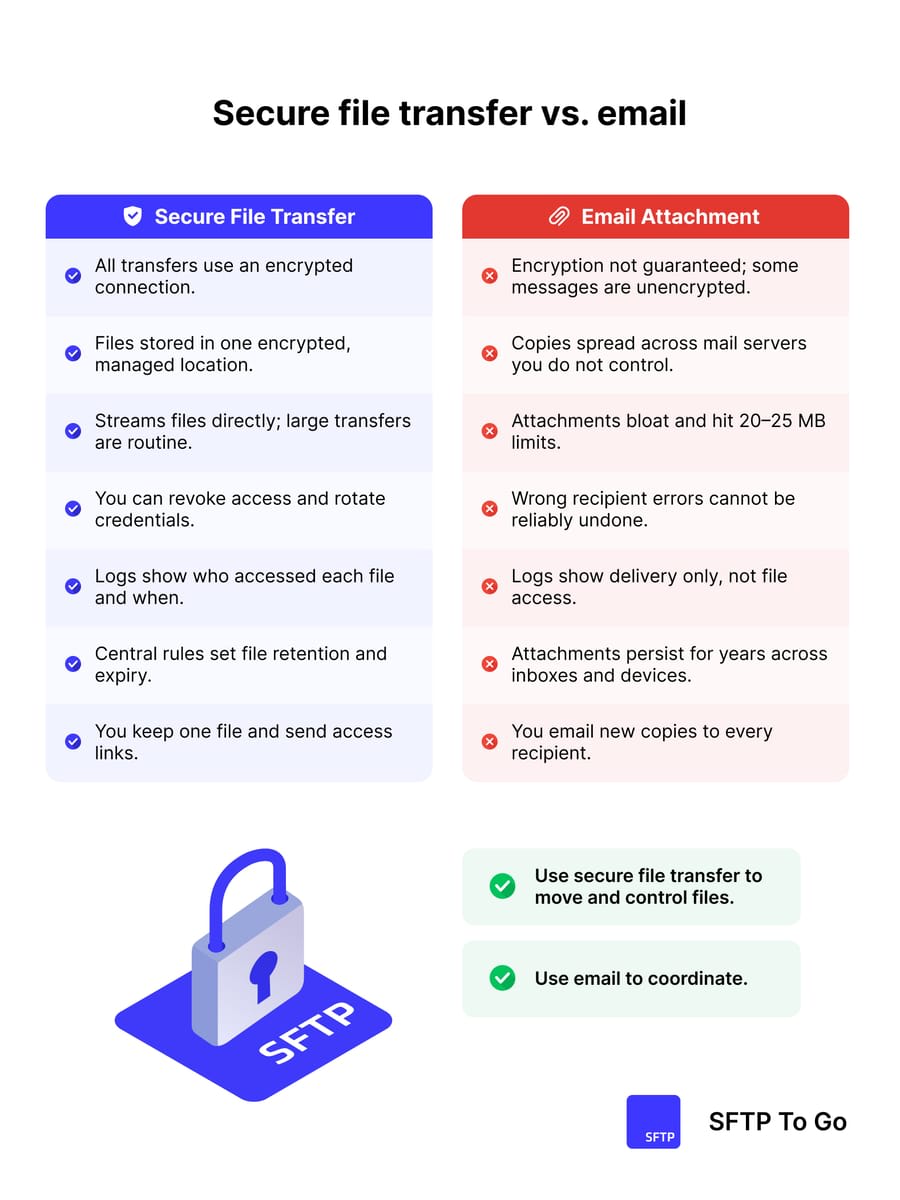
This post compares secure file transfer vs email, across the areas that matter: encryption, size and efficiency, human error, auditing, expiry, and share links.
What “encryption” really means: email vs secure file transfer
Most modern email providers use TLS between mail servers. That protects messages in transit if both sides support it, but it is usually “opportunistic TLS”: if a secure channel can’t be negotiated, messages may still be delivered in plaintext, which is unfortunately both readable and alterable should it be intercepted. End-to-end email encryption (PGP, S/MIME) exists, but deployment is limited and hard to standardize across partners.
In real life, you rarely know whether a recipient’s email system encrypts data at rest, how keys are handled, or what happens when messages are forwarded. If you use a hosted, secure file transfer service, the server is typically a central managed endpoint, which means encryption in transit and added features like at-rest encryption, access controls, logging, and the SSH tunnel for every transfer are all defined up front.
Cipher suites and key exchange algorithms can be tightly controlled on the server, and access can be enforced with SSH keys rather than passwords. With a managed SFTP platform like SFTP To Go, you also get consistent TLS for any HTTPS access on top of the S3 secure storage, plus extra measures like IP allowlists and MFA.
Long story short: email security depends on a long chain of external mail systems with zero oversight; Managed file transfer, with protocols like SFTP and FTPS, gives you a single, controlled termination point for encrypted transport.
File size limits and efficiency
Email was never designed for bulk file transfer. Attachments are encoded using Base64, which inflates the size of binary data by roughly 33 percent, sometimes more once line breaks and headers are included.
On top of that, mailbox providers enforce tight message size limits. Typical defaults look like this:
- Outlook.com and many internet accounts: around 20–25 MB per message (see for example)
- Exchange accounts: often 10 MB by default (see message size limits here)
- Gmail: 25 MB per message, with the effective attachment size smaller once encoding overhead is counted (see here)
So your “20 MB” file can easily become roughly 26–27 MB on the wire, and may silently hit limits on either the sender or recipient side. Because that inflated size is what counts against provider message-size limits, the real-world maximum attachment size you can safely rely on is noticeably lower than the headline limit.
SFTP, for example, has none of this MIME overhead. Files are streamed as binary over the encrypted channel.
Practical limits are defined by:
- Account or bucket storage quotas
- Any per-file limits you configure on the server
- Available network bandwidth and latency
With a managed SFTP service backed by object storage, multi-gigabyte and even multi-terabyte transfers are routine, and a capable SFTP client can run parallel transfers and cleanly resume interrupted uploads without re-sending data that has already reached the server.
The cost of a mistake: wrong recipients
With email, sending a file to the wrong address is irreversible. Once a message leaves your SMTP infrastructure, you cannot reliably recall it. Regulators and vendors have shown repeatedly that human error is the most common cause of reported data breaches, and that misdirected email is a major culprit.
Even if you spot the error immediately, your realistic options with email are limited: you send a follow-up message asking the unintended recipient to delete the data and you log an incident. This is really not ideal.
With SFTP, access is a permission rather than an irreversible delivery. This alone should be a deciding factor if compliance and data security are of any importance in your industry. If you grant a partner an SFTP account or a time-limited HTTPS share link (which is a feature of managed secure transfer solutions like SFTP To Go) and later discover a mistake, you can:
- Disable that account or revoke the share link
- Rotate credentials or keys
- Update IP allow lists
- Delete or move the files from the server
None of that magically erases data if someone already downloaded it, but it sharply reduces blast radius, dwell time, and ongoing access. These measures have absolutely no parallels in email ecosystems.
Auditing and evidence
Email systems can log message IDs, sender, recipient, and high-level delivery status. That’s fine for basic troubleshooting, but for security and compliance it constitutes weak evidence:
- You can’t easily prove whether a specific recipient opened or downloaded a particular attachment (depending on your service).
- Forwarding, printing, and local copies are usually opaque.
- Logs are scattered between multiple providers and client devices.
SFTP servers, especially managed platforms, can maintain detailed activity logs for uploads, downloads, directory listings, authentication attempts, and administrative changes.
That gives you:
- Precise records of who accessed which file, from which IP, and when
- A clear distinction between successful and failed access attempts
- A single audit trail you can feed into SIEM via API or webhooks, or pull for compliance
Services like SFTP To Go expose detailed audit logs and provide a range of security features on top of SFTP/FTPS/HTTPS and S3 access, which makes it much easier to back up compliance claims for frameworks like HIPAA, SOC 2, and GDPR.
Expiration and lifecycle
Email attachments replicate by default. Once you send a file, copies reside in:
- The sender’s sent items and archives
- The recipient’s mailbox, backups, and any synced devices
- Any additional mailboxes that receive forwarded copies
There is rarely a central way to enforce retention, deletion, or access expiry across that sprawl. It is not ideal. Secure file transfer workflows are the opposite of this. Files live in a controlled repository, and you distribute access rather than copies. No copies are generated!
You can:
- Set object-level retention or lifecycle policies in the storage
- Use expiring share links for external users
- Revoke partner accounts or keys when a relationship ends
- Apply uniform backup and deletion policies on the server side
A managed secure file transfer platform, like SFTP To Go, keeps all of this on a single, controlled endpoint and applies the same retention and expiry rules to both automated SFTP/FTPS transfers and browser-based access over HTTPS. What more could you ask for?
Share links vs attachments
With email attachments, you have little to no control over:
- How many times a file is downloaded
- From which networks it is accessed
- Whether a password is required
- When access should expire
Modern secure file transfer platforms can combine SFTP or FTPS transfer with secure convenience features like HTTPS share links. You upload once, then send partners a link instead of an attachment.
You can then:
- Enforce TLS on all web access
- Require a password or authenticated login
- Limit the lifetime of the link
- Limit allowed HTTP methods
- Monitor downloads via logging and alerts
From a user’s point of view, this feels close to email or basic file sharing. In secret though, everything is anchored in a controlled transfer and storage environment that supports compliance and security.
Automation, integration, and repeatability
Most serious data flows don’t comprise one-off, manual transfers. They are recurring jobs: daily exports from SaaS systems, nightly backups, hourly inbound files from partners.
Email does a poor job here:
- Scheduling is delegated to humans or scheduler apps.
- Error handling is fragile; bounced messages and throttling are common.
- Trying to automatically read and process data from email content breaks easily, because tiny changes in formatting, client behaviour, or layouts can cause the parsing to fail.
SFTP, by contrast, fits cleanly into automated and heavy duty flows:
- Cron schedulers (like Cron To Go) and workflow tools
- ETL and integration platforms (like Make.com and Integrate.io)
- CI/CD pipelines and batch jobs
A managed cloud SFTP service can expose an API for provisioning users and directories, webhooks for new-file notifications, and standardized storage semantics.
SFTP To Go is a fine example of this. SFTP, FTPS, and HTTPS on top of S3 storage, with webhooks and automation hooks that fit into existing pipelines without admins having to run SSH servers themselves.
Compliance and data protection expectations
Regulators and security frameworks converge on a few fundamental expectations for file transfer and storage:
- Encryption in transit and at rest
- Strong authentication and least-privilege access
- Centralized logging and monitoring
- Data minimization, retention control, and the ability to delete
You can tick some of these boxes with hardened email setups, enforced TLS, DLP add-ons, and encryption tools. In practice, though, it’s not feasible to try and prove consistent adherence across every recipient domain, forwarding chain, and endpoint.
SFTP and related secure file transfer mechanisms align more directly (and intentionally) to these requirements.
You can:
- Guarantee that every transfer uses defined cipher suites
- Tie access to explicit accounts or SSH keys
- Centralize logs in one place
- Enforce strong storage-side retention and deletion rules
Most admins will agree that, besides how much easier this makes your audits, reducing the number of external systems you have to rely on makes oversight that much easier.
When email is “good enough” and when to switch
With all that said, there are still places where plain email is acceptable:
- Low-sensitivity information that’s already public
- One-off, small files where occasional delivery failures are tolerable
- Informal collaboration where security is neither here nor there
For anything that involves personal data, financial records, health information, internal IP, or contractual obligations, the obvious option is to:
- Use SFTP through a managed secure file transfer service like SFTP To Go, with built in secure storage.
- Use HTTPS share links on top for human-friendly sharing.
- Keep email for notifications, low detail summaries, and coordination, but secure SFTP as the primary file transfer channel.
This shift removes an entire class of avoidable incidents rooted in misdirected attachments, MIME bloating, and uncontrolled copies, and it aligns much better with current expectations for encryption, auditing, and lifecycle control. For file transfer in healthcare, finance, and other regulated industries, it’s not an option but a necessity.
In conclusion
If you care about anything more than casual sharing, treat email as a way to talk about files, not to move them. Keep the real data on a controlled and managed secure file transfer service where you decide how access, encryption, logs, and expiry work and where your files stay in one place.
Recent reporting on email-related data breaches
Frequently asked questions
Is email secure enough for sensitive file transfer?
Usually not. Standard email relies on opportunistic TLS and distributed storage you do not control. Without end-to-end encryption and strict policies on both sides, you cannot reliably treat it as a secure file transfer mechanism.
Why is SFTP, FTPS, and secure file transfer better than email for large files?
SFTP and FTPS don't use MIME or Base64, so there is no 33 percent overhead, and there are no hard 20–25 MB message limits enforced by mailbox providers. Transfers over SFTP and FTPS are bounded by your server configuration and storage, not arbitrary per-message caps.
How do FTPS and SFTP reduce human error risk compared with email?
The FTPS and SFTP protocols don’t reduce human error by themselves. The risk reduction comes from managed file transfer platforms that use FTPS/SFTP with per-user accounts and permissions, revocable credentials, expiring share links, and audit logs, plus automation for scheduled or event-triggered transfers to remove manual attaching and addressing errors.