

If you’ve ever needed to upload large files over SFTP, then you know how annoying connection drops and network timeouts can be. This guide will show you how to build a Python script that picks up from where you left off when your uploads get interrupted, hopefully saving you time and helping you avoid unnecessary stress.

This is a companion piece to our recent guide on resuming SFTP downloads. The concepts that we cover here are similar to our previous guide, so don’t worry, it’s not deja vu.

Instead of checking the remote file and appending to our local file, we check our local file and append to the remote file. By the end of this article, you’ll have a working SFTP upload script that handles interruptions with both standard SFTP servers, and S3 backed services like SFTP To Go. 


What does “resume” mean for SFTP uploads?

Resuming SFTP uploads means continuing the transmission from where it left off if the upload gets interrupted. The SFTP protocol supports this functionality by using byte offsets (the exact position in bytes inside a file where you start reading or writing), but the client has to implement the logic. Here’s a basic run down of how it works:

  • Check if a partial remote file exists (again, we use a .part file extension, but this time it gets created on the server )
  • Get the file’s size in bytes
  • Get the local file’s total size (this is the file that we will be checking our upload progress against)
  • Open the local file and seek to the matching offset when resuming
  • Read from that offset and append to the remote file
  • Once the upload is done, we’ll rename the .part file to the final filename

This only works if the local file hasn’t changed since the upload started. If we modify the source file mid-upload, then the file being sent would not match and our upload would be corrupted. For this, we’ll add some verification to catch it.


Prerequisites

For this guide you’ll need Python 3.7+, Paramiko and Tenacity.

pip install paramiko tenacity


Connect to your SFTP server

The connection setup is the same as the download script. Here is a simple version using SSH key authentication:

#sftp-upload-1.py example script

import paramiko
import os
def create_sftp_client(hostname, port, username, key_path):
  """Create and return an SFTP client connection."""
  ssh = paramiko.SSHClient()
  ssh.load_system_host_keys()
  ssh.set_missing_host_key_policy(paramiko.RejectPolicy())
 
  private_key = paramiko.Ed25519Key.from_private_key_file(key_path)
  ssh.connect(hostname, port=port, username=username, pkey=private_key)
 
  sftp = ssh.open_sftp()
  return ssh, sftp
if __name__ == "__main__":
  ssh, sftp = create_sftp_client(
      hostname="your_host",
      port=22,
      username="your_username",
      key_path=os.path.expanduser("~/.ssh/id_ed25519")
  )
 
  print(f"Connected to: {sftp.normalize('.')}")
  print(f"Files: {sftp.listdir('.')}")
 
  sftp.close()
  ssh.close()

Here are a few things about this setup:

  • We use load_system_host_keys() to verify the server’s identity from ~/.ssh/known_hosts
  • The RejectPolicy() will reject connections to unknown hosts
  • Ed25519 keys are secure for SFTP, but you can swap to your preferred key type if you need to 

If you see authentication errors, make sure that you added your public key to your SFTP server. For SFTP To Go, you can do this from the Dashboard > Credentials tab. You can check out the documentation for adding SSH keys for all the details of doing this for yourself.


Check file sizes

For uploads, we need to check our local file and the remote size of any potential partial upload files that didn’t complete:

def get_local_size(local_path):
  """Return size of local file."""
  return os.path.getsize(local_path)

def get_remote_size(sftp, remote_path):
  """Return size of remote file, or 0 if it doesn't exist."""
  try:
      return sftp.stat(remote_path).st_size
  except FileNotFoundError:
      return 0

The main difference from the download version of the script in our previous article is that we’re checking for the .part file on the server, and not locally. If a partial file does exist, then we’ll continue from that byte position.


Upload with resume support

Here’s a partial version of our script that shows the core upload logic. I’ve added a delay like last time so that you can press Ctrl+C to interrupt the upload yourself and see how the resume functionality works:

# sftp-upload-2.py example script
import paramiko
import os
import time
def create_sftp_client(hostname, port, username, key_path):
  """Create and return an SFTP client connection."""
  ssh = paramiko.SSHClient()
  ssh.load_system_host_keys()
  ssh.set_missing_host_key_policy(paramiko.RejectPolicy())
 
  private_key = paramiko.Ed25519Key.from_private_key_file(key_path)
  ssh.connect(hostname, port=port, username=username, pkey=private_key)
 
  sftp = ssh.open_sftp()
  return ssh, sftp
def get_local_size(local_path):
  """Return size of local file."""
  return os.path.getsize(local_path)
def get_remote_size(sftp, remote_path):
  """Return size of remote file, or 0 if it doesn't exist."""
  try:
      return sftp.stat(remote_path).st_size
  except FileNotFoundError:
      return 0
def upload_with_resume(sftp, local_path, remote_path, chunk_size=32768):
  """
  Upload a file with resume support.
 
  Uses a .part file on the server during transfer and renames on success.
  Returns the total bytes uploaded in this session.
  """
  part_path = remote_path + ".part"
 
  local_size = get_local_size(local_path)
  remote_size = get_remote_size(sftp, part_path)
 
  # Already complete?
  if remote_size >= local_size:
      print(f"File already complete ({remote_size:,} bytes)")
      try:
          sftp.remove(remote_path)
      except FileNotFoundError:
          pass
      sftp.rename(part_path, remote_path)
      return 0
 
  print(f"Local size:  {local_size:,} bytes")
  print(f"Remote size: {remote_size:,} bytes")
  print(f"Resuming from byte {remote_size:,}")
 
  bytes_uploaded = 0
 
  # Open local file and seek to where we left off
  with open(local_path, 'rb') as local_file:
      local_file.seek(remote_size)
     
      # Open remote file in append mode
      with sftp.open(part_path, 'ab') as remote_file:
          while True:
              chunk = local_file.read(chunk_size)
              if not chunk:
                  break
              remote_file.write(chunk)
              bytes_uploaded += len(chunk)
             
              total = remote_size + bytes_uploaded
              percent = (total / local_size) * 100
              print(f"\rProgress: {percent:.1f}% ({total:,}/{local_size:,} bytes)", end="", flush=True)
             
              # Slow down for testing - remove this in production
              time.sleep(0.05)
 
  print()
 
  # Verify and rename
  final_size = sftp.stat(part_path).st_size
  if final_size == local_size:
      try:
          sftp.remove(remote_path)
      except FileNotFoundError:
          pass
      sftp.rename(part_path, remote_path)
      print(f"Upload complete: {remote_path}")
  else:
      print(f"Size mismatch: expected {local_size:,}, got {final_size:,}")
 
  return bytes_uploaded
if __name__ == "__main__":
  ssh, sftp = create_sftp_client(
      hostname="your_hostname",
      port=22,
      username="your_username",
      key_path=os.path.expanduser("~/.ssh/id_ed25519")
  )
 
  print("Connected to SFTP server\n")
 
  local_path = "/your/local/path/to/file"
  remote_path = "/your/remote/path/to/file"
 
  print(f"Uploading: {local_path}")
  print("(Press Ctrl+C to interrupt, then run again to resume)\n")
 
  try:
      bytes_up = upload_with_resume(sftp, local_path, remote_path)
      print(f"\nUploaded {bytes_up:,} bytes in this session")
  except KeyboardInterrupt:
      print("\n\nUpload interrupted! Run the script again to resume.")
 
  sftp.close()
  ssh.close()


Here is the script running. We interrupted the upload several times and resumed each time until the upload completed.
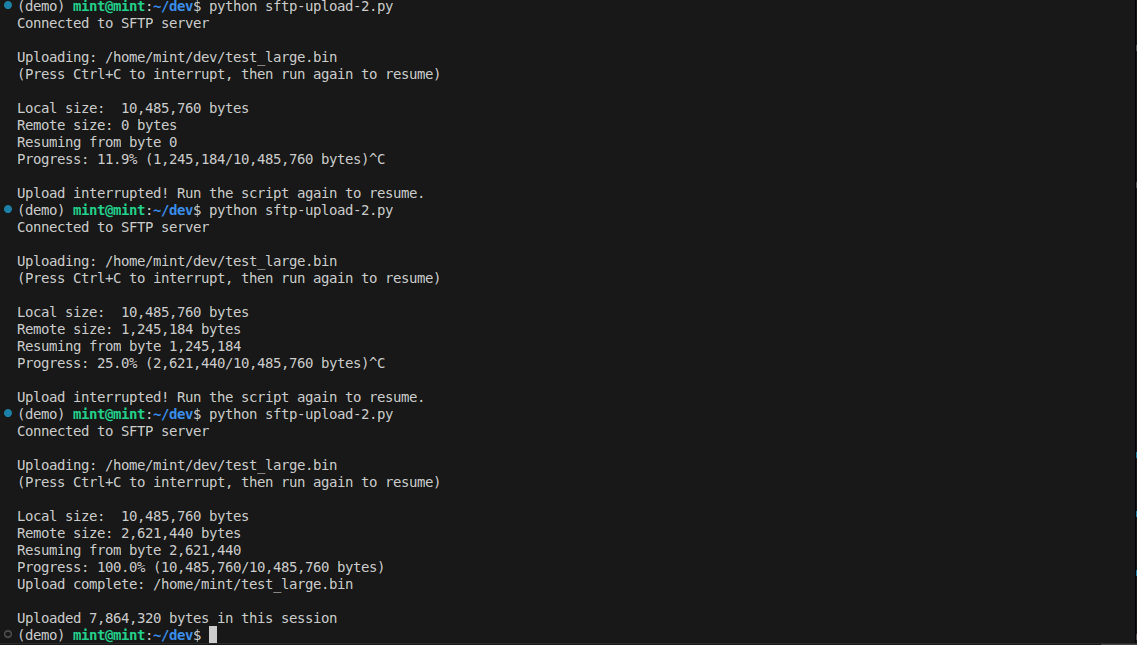
resume interrupted sftp transfer

The key parts that cover the resume functionality are:

  • sftp.open(part_path, ‘ab’) : This opens the remote file in append-binary mode and allows the file to be appended to
  • local_file.seek(remote_size): This jumps to the byte offset where we left off
  • We write to a .part file and only rename it to the actual file extension once the upload completes
  • chunk_size=32768 uses 32kb chunks of data. You can experiment with these sizes, but 32kb gives us a good balance between memory usage and transfer efficiency

Handle connection drops with retry logic

We can wrap our upload function with automatic retry logic just like we did with the download script by using the tenacity library.

from tenacity import retry, stop_after_attempt, wait_fixed, retry_if_exception_type
@retry(
  stop=stop_after_attempt(3),
  wait=wait_fixed(5),
  retry=retry_if_exception_type((paramiko.SSHException, OSError, IOError)),
  reraise=True
)
def upload_with_retry(hostname, port, username, key_path, local_path, remote_path):
  """
  Upload a file with automatic reconnection on failure.
  Waits 5 seconds between attempts.
  """
  ssh = None
  try:
      print("\nConnecting...")
      ssh, sftp = create_sftp_client(hostname, port, username, key_path)
     
      upload_with_resume(sftp, local_path, remote_path)
     
      # Check if complete (final file exists, not .part)
      try:
          sftp.stat(remote_path)
          print("Transfer successful!")
          return True
      except FileNotFoundError:
          raise IOError("Upload incomplete")
         
  finally:
      if ssh:
          ssh.close()

If your connection drops during the upload:

  • The decorator catches the exception
  • It waits 5 seconds before retrying
  • It reconnects and calls upload_with_resume() again
  • The resume function checks the .part file and carries on from there

Verify the local file hasn’t changed

Resuming only works if the local file stays the same throughout the upload. If the file is modified mid transfer, then you could end up with corrupted data on your target machine. That’s bad. We don’t like that. 

To catch this, the script stores the local file’s size and modification timestamp in a .upload.meta file when the upload starts. On resume, it compares these values to the current file. If either has changed, the partial upload on the server is stale, so the script discards it and starts from fresh.

To be extra cautious with large files, you can add --verify tail, which checksums the last 1MB of the file before resuming. This catches edits that don't change the file size or timestamp, but adds a little overhead for very large files. 


Choosing the chunk size

The chunk_size parameter can help you fine tune the script's performance if you have constraints like an ancient local or remote machine, or a glacially slow internet connection.  

  • Smaller chunks (8KB - 16KB): This will use less memory but will result in more round trips, making it slightly slower
  • Larger Chunks (64KB - 128KB): You’ll use more memory but have fewer round trips. This has the potential to give you faster upload speeds if your connection is solid
  • Default (32KB): This is the best balance, and it matches Paramiko’s default internal buffer size 

For the majority of use cases, you won’t have to change this setting. If you’re uploading very large files over a stable connection then you can experiment with increasing the chunk size to see if you get any performance gains.


Complete script

#!/usr/bin/env python3
"""
SFTP uploader with resume support.

Usage:
  python sftp_upload.py <local_path> <remote_path> [options]

Examples:
  python sftp_upload.py ./data.zip /uploads/data.zip
  python sftp_upload.py ./data.zip /uploads/data.zip --verify tail
  python sftp_upload.py ./data.zip /uploads/data.zip --host myserver.sftptogo.com --user myuser --key /path/to/key
"""

import paramiko
import os
import sys
import hashlib
import argparse
from tenacity import retry, stop_after_attempt, wait_fixed, retry_if_exception_type


class SFTPUploader:
  """SFTP client with resume support for interrupted uploads."""

  def __init__(self, hostname, port=22, username=None, key_path=None, password=None):
      """
      Initialize the SFTP uploader.

      Args:
          hostname: SFTP server hostname
          port: SFTP server port (default: 22)
          username: SFTP username
          key_path: Path to SSH private key (optional)
          password: Password for auth (optional, used if no key_path)
      """
      self.hostname = hostname
      self.port = port
      self.username = username
      self.key_path = key_path
      self.password = password
      self.ssh = None
      self.sftp = None

  def connect(self):
      """Establish SSH and SFTP connections."""
      self.ssh = paramiko.SSHClient()
      self.ssh.load_system_host_keys()
      self.ssh.set_missing_host_key_policy(paramiko.RejectPolicy())

      if self.key_path:
          # Auto-detect key type
          key_classes = [
              paramiko.Ed25519Key,
              paramiko.RSAKey,
              paramiko.ECDSAKey,
          ]
          private_key = None
          for key_class in key_classes:
              try:
                  private_key = key_class.from_private_key_file(self.key_path)
                  break
              except paramiko.SSHException:
                  continue
          if private_key is None:
              raise paramiko.SSHException(f"Unable to load key from {self.key_path}")
          self.ssh.connect(self.hostname, port=self.port, username=self.username, pkey=private_key)
      else:
          self.ssh.connect(self.hostname, port=self.port, username=self.username, password=self.password)

      self.sftp = self.ssh.open_sftp()

  def disconnect(self):
      """Close SFTP and SSH connections."""
      if self.sftp:
          self.sftp.close()
          self.sftp = None
      if self.ssh:
          self.ssh.close()
          self.ssh = None

  def __enter__(self):
      """Context manager entry."""
      self.connect()
      return self

  def __exit__(self, exc_type, exc_val, exc_tb):
      """Context manager exit."""
      self.disconnect()
      return False

  def get_local_size(self, local_path):
      """Return size of local file."""
      return os.path.getsize(local_path)

  def get_local_mtime(self, local_path):
      """Return modification time of local file."""
      return os.path.getmtime(local_path)

  def get_remote_size(self, remote_path):
      """Return size of remote file, or 0 if it doesn't exist."""
      try:
          return self.sftp.stat(remote_path).st_size
      except FileNotFoundError:
          return 0

  def calculate_local_checksum(self, local_path, chunk_size=32768):
      """Calculate MD5 checksum of entire local file."""
      md5 = hashlib.md5()

      with open(local_path, "rb") as f:
          while True:
              chunk = f.read(chunk_size)
              if not chunk:
                  break
              md5.update(chunk)

      return md5.hexdigest()

  def calculate_local_tail_checksum(self, local_path, tail_size=1048576, chunk_size=32768):
      """
      Calculate MD5 checksum of the last portion of a local file.

      Much faster than full-file checksum while still detecting most changes.

      Args:
          local_path: Path to local file
          tail_size: Bytes to read from end of file (default: 1MB)
          chunk_size: Read chunk size in bytes

      Returns:
          Tuple of (checksum, file_size)
      """
      md5 = hashlib.md5()
      local_size = self.get_local_size(local_path)

      # For small files, just checksum the whole thing
      if local_size <= tail_size:
          return self.calculate_local_checksum(local_path, chunk_size), local_size

      start_pos = local_size - tail_size

      with open(local_path, "rb") as f:
          f.seek(start_pos)
          bytes_read = 0
          while bytes_read < tail_size:
              chunk = f.read(min(chunk_size, tail_size - bytes_read))
              if not chunk:
                  break
              md5.update(chunk)
              bytes_read += len(chunk)

      return md5.hexdigest(), local_size

  def _upload_with_resume(self, local_path, remote_path, chunk_size=32768):
      """
      Upload a file with resume support.

      Uses a .part file on the server during transfer and renames on success.
      Returns the total bytes uploaded in this session.
      """
      part_path = remote_path + ".part"

      local_size = self.get_local_size(local_path)

      # Check if remote .part file exists and get its size
      try:
          remote_size = self.sftp.stat(part_path).st_size
      except FileNotFoundError:
          remote_size = 0

      # Handle empty files
      if local_size == 0:
          print("Local file is empty (0 bytes)")
          with self.sftp.open(remote_path, 'w') as f:
              pass
          try:
              self.sftp.remove(part_path)
          except FileNotFoundError:
              pass
          return 0

      # Already complete?
      if remote_size >= local_size:
          print(f"File already complete ({remote_size:,} bytes)")
          try:
              self.sftp.remove(remote_path)
          except FileNotFoundError:
              pass
          self.sftp.rename(part_path, remote_path)
          return 0

      print(f"Local:  {local_size:,} bytes")
      print(f"Remote: {remote_size:,} bytes")
      if remote_size > 0:
          print(f"Resuming from byte {remote_size:,}")

      bytes_uploaded = 0

      # Open local file and seek to where we left off
      with open(local_path, 'rb') as local_file:
          local_file.seek(remote_size)

          # Open remote file in append mode
          with self.sftp.open(part_path, 'ab') as remote_file:
              while True:
                  chunk = local_file.read(chunk_size)
                  if not chunk:
                      break
                  remote_file.write(chunk)
                  bytes_uploaded += len(chunk)

                  total = remote_size + bytes_uploaded
                  percent = (total / local_size) * 100
                  print(f"\rProgress: {percent:.1f}% ({total:,}/{local_size:,} bytes)", end="", flush=True)

      print()

      # Verify and rename
      final_size = self.sftp.stat(part_path).st_size
      if final_size == local_size:
          try:
              self.sftp.remove(remote_path)
          except FileNotFoundError:
              pass
          self.sftp.rename(part_path, remote_path)
          print(f"Complete: {remote_path}")
      else:
          print(f"Size mismatch: expected {local_size:,}, got {final_size:,}")

      return bytes_uploaded

  def upload(self, local_path, remote_path, verify=None, tail_size=1048576, chunk_size=32768):
      """
      Upload with resume support and local file change detection.

      Always stores file size and modification timestamp in a local
      .upload.meta file to detect source file changes between attempts.
      Optionally runs a tail checksum for extra confidence.

      Args:
          local_path: Local source path
          remote_path: Path to file on server
          verify: Optional extra verification ("tail" for tail checksum)
          tail_size: Bytes to checksum from end of file when verify="tail" (default: 1MB)
          chunk_size: Upload chunk size in bytes
      """
      part_path = remote_path + ".part"
      meta_path = local_path + ".upload.meta"

      # Always store size + mtime to detect local file changes
      local_size = str(self.get_local_size(local_path))
      local_mtime = str(self.get_local_mtime(local_path))
      local_value = f"{local_size}:{local_mtime}"

      # Optionally add tail checksum for extra confidence
      if verify == "tail":
          print(f"Calculating local tail checksum (last {tail_size:,} bytes)...")
          checksum, _ = self.calculate_local_tail_checksum(local_path, tail_size, chunk_size)
          local_value = f"{local_value}:{checksum}"
          print(f"Local tail MD5: {checksum}")

      # Check if remote .part file exists
      try:
          remote_part_exists = self.sftp.stat(part_path)
      except FileNotFoundError:
          remote_part_exists = None

      # If remote .part exists but local .meta is missing, start fresh
      if remote_part_exists and not os.path.exists(meta_path):
          print("Partial upload found without metadata. Starting fresh.")
          self.sftp.remove(part_path)

      # Check for existing partial upload
      if remote_part_exists and os.path.exists(meta_path):
          with open(meta_path, "r") as f:
              saved_value = f.read().strip()

          if saved_value != str(local_value):
              print("Local file changed since last upload. Starting fresh.")
              self.sftp.remove(part_path)
              os.remove(meta_path)
          else:
              print("Source file unchanged. Resuming upload...")

      # Save current value for future verification
      with open(meta_path, "w") as f:
          f.write(str(local_value))

      # Upload
      self._upload_with_resume(local_path, remote_path, chunk_size)

      # Clean up meta file on success
      try:
          self.sftp.stat(remote_path)
          if os.path.exists(meta_path):
              os.remove(meta_path)
      except FileNotFoundError:
          pass

  @retry(
      stop=stop_after_attempt(3),
      wait=wait_fixed(5),
      retry=retry_if_exception_type((paramiko.SSHException, OSError, IOError)),
      reraise=True
  )
  def upload_with_retry(self, local_path, remote_path, verify=None, tail_size=1048576, chunk_size=32768):
      """
      Upload a file with automatic retry on connection failure.

      Args:
          local_path: Local source path
          remote_path: Path to file on server
          verify: Optional extra verification ("tail" for tail checksum)
          tail_size: Bytes to checksum from end of file when verify="tail"
          chunk_size: Upload chunk size in bytes

      Returns:
          True if upload completed successfully
      """
      try:
          self.connect()
          self.upload(local_path, remote_path, verify, tail_size, chunk_size)

          # Check if complete
          try:
              self.sftp.stat(remote_path)
              print("\nTransfer successful!")
              return True
          except FileNotFoundError:
              raise IOError("Upload incomplete")

      finally:
          self.disconnect()


def main():
  parser = argparse.ArgumentParser(
      description="Upload files over SFTP with resume support.",
      formatter_class=argparse.RawDescriptionHelpFormatter,
      epilog="""
Examples:
%(prog)s ./data.zip /uploads/data.zip --host myserver.sftptogo.com --user myuser
%(prog)s ./data.zip /uploads/data.zip --host myserver.com --key ~/.ssh/id_ed25519
%(prog)s ./data.zip /uploads/data.zip --verify tail

The script always checks the local file's size and modification timestamp
before resuming. Use --verify tail to also checksum the last 1MB of the
file for extra confidence that the source hasn't changed.
      """
  )

  parser.add_argument("local_path", help="Local source file path")
  parser.add_argument("remote_path", help="Path on SFTP server")
  parser.add_argument(
      "--host",
      default=os.environ.get("SFTP_HOST", ""),
      help="SFTP server hostname (or set SFTP_HOST env var)"
  )
  parser.add_argument(
      "--port",
      type=int,
      default=int(os.environ.get("SFTP_PORT", "22")),
      help="SFTP server port (default: 22)"
  )
  parser.add_argument(
      "--user",
      default=os.environ.get("SFTP_USER", ""),
      help="SFTP username (or set SFTP_USER env var)"
  )
  parser.add_argument(
      "--key",
      default=os.environ.get("SFTP_KEY", ""),
      help="Path to SSH private key (or set SFTP_KEY env var)"
  )
  parser.add_argument(
      "--password",
      default=os.environ.get("SFTP_PASSWORD", ""),
      help="SFTP password (or set SFTP_PASSWORD env var). Use --key instead when possible."
  )
  parser.add_argument(
      "--verify",
      choices=["tail"],
      default=None,
      help="Extra verification: 'tail' checksums last 1MB of local file before resuming"
  )
  parser.add_argument(
      "--tail-size",
      type=int,
      default=1048576,
      help="Bytes to checksum when using --verify tail (default: 1048576 = 1MB)"
  )
  parser.add_argument(
      "--chunk-size",
      type=int,
      default=32768,
      help="Upload chunk size in bytes (default: 32768)"
  )

  args = parser.parse_args()

  # Validate required arguments
  if not args.host:
      parser.error("--host is required (or set SFTP_HOST environment variable)")
  if not args.user:
      parser.error("--user is required (or set SFTP_USER environment variable)")
  if not args.key and not args.password:
      parser.error("Either --key or --password is required")

  print(f"Uploading to {args.user}@{args.host}:{args.port}")
  print(f"Local file:  {args.local_path}")
  print(f"Remote file: {args.remote_path}")
  if args.verify:
      print(f"Extra verification: {args.verify}")

  uploader = SFTPUploader(
      hostname=args.host,
      port=args.port,
      username=args.user,
      key_path=args.key if args.key else None,
      password=args.password if args.password else None
  )

  try:
      success = uploader.upload_with_retry(
          local_path=args.local_path,
          remote_path=args.remote_path,
          verify=args.verify,
          tail_size=args.tail_size,
          chunk_size=args.chunk_size
      )
      sys.exit(0 if success else 1)
  except Exception as e:
      print(f"\nUpload failed after retries: {e}")
      sys.exit(1)


if __name__ == "__main__":
  main()

Here is the script actually running. You can see that the remote file shows 0 bytes because nothing has been uploaded yet. I left the upload to run for a few minutes and then cancelled it. I launched it with these parameters:

python sftp_upload.py test_large.bin /test_large.bin --host myhost.sftptogo.com --user myusername --key ~/.ssh/id_ed25519

I then resumed the upload and we can clearly see that the script identified the .part file and then resumed from byte 8,257,536.

how to resume interrupted sftp transfers

Success! The upload then completed as per normal. 

resume interrupted sftp transfers

Troubleshooting 

Here are some common issues that you might come across when you’re trying to upload to SFTP with resume support.

Host key verification failures

If you see this error:

paramiko.ssh_exception.SSHException: Server 'host.com' not found in known_hosts

All you need to do is add your host to your known_hosts like this:

ssh-keyscan -t ed25519 host.com >> ~/.ssh/known_hosts

Connection timeouts on large files

Sometimes a long-running upload can trigger idle timeouts on the server side. You might see common errors like:

Socket exception: Connection reset by peer

or

paramiko.ssh_exception.SSHException: Server connection dropped

The good news for us is that our retry logic handles this automatically. If you find your uploads failing a little too often, try adding SSH keep-alive:

transport.set_keepalive(30)  # Send keepalive every 30 seconds

Uploads finished but the remote file is corrupt

If the uploaded file is corrupted after resuming, the local file could have changed in between upload attempts. It’s not a common issue, but as we all know, in IT, anything is possible. To stop this from happening in the future we can use --verify tail for files that might be modified:

python sftp_upload.py ./data.zip /uploads/data.zip --verify tail

Permission denied on upload

If you see permission errors:

  • Check that your SFTP user has write access to the upload-target directory 
  • Verify the remote path is correct and that it actually exists (ask me how I know to check for this one… It happens to the best of us).
  • For SFTP To Go, check your credential's permissions in the Dashboard and make sure everything is configured correctly

Wrapping up

You now have a Python script that handles interrupted SFTP uploads! This means you don’t have to start from zero again when your connection drops.

Check out the sftptogo-examples repo on GitHub for the complete code. We’ll be adding a combined script that handles both uploads and downloads, so be sure to check back soon.

Looking for the download equivalent? See our companion guide: How to resume interrupted SFTP downloads in Python.

If you need to automate these transfers on a schedule then check out SFTP automation with tools like Cron To Go.


Frequently asked questions

What's the difference between sftp.put() and a custom resume script?

The built-in sftp.put() method uploads files in one shot with no resume support. If it fails mid-transfer, you will have to all start over again. That’s fine for small files, but if you are trying to upload something more substantial like a system image or large archives, then it’s no fun at all. Our handy script tracks progress with a .part file on the server, allowing you to continue on your merry way after failures.

How do I know if the local file changed during upload?

The script stores the local file's size, timestamp, or checksum in a .upload.meta file when the upload starts. It acts like a mini manifest of what you’re trying to upload. If our upload gets interrupted and we need to start again, we compare the information in the meta file to the current file. If they’re different, we throw out the partial upload and start fresh.

You can choose your verification method with the --verify flag:

  • Size (default): fastest, works everywhere (Legacy SFTP and S3 backed cloud SFTP).
  • Timestamp: fast, detects most modifications.
  • Tail: checksums last 1MB, good balance of speed and reliability.
Can I resume downloads the same way?

Yes! Check out our companion guide: How to resume interrupted SFTP downloads in Python.

Why use a .part file on the server?

Using a .part extension tells us that the upload hasn’t completed yet, and that it is only partially done.

What's the size limit for SFTP uploads?

There's no practical limit in Paramiko. SFTP supports 64-bit file offsets, so theoretically you could upload exabytes. Real limits are your connection speed, server storage, and patience.

What happens if the script crashes halfway through the upload?

The .part file stays on the server exactly where it was. Run the script again and it resumes from that point.