

Cloud SFTP gives businesses a secure way to exchange files without running and maintaining their own SFTP servers.
In a working business environment, especially in regulated industries, file transfer needs more than a hosted endpoint. It needs centralized and secure cloud storage. Partners need separated folders. Internal teams need browser access. Applications need dedicated credentials. Compliance teams need audit records. Operations teams need visibility into file arrivals, downloads, failed logins, permissions, and follow-up actions.
Managed cloud SFTP brings those requirements into one file transfer environment. Your team gets secure protocols, cloud storage, user permissions, audit logs, automation options, and access for both technical and non-technical users, without taking on the server maintenance yourself.
For teams moving finance files, healthcare documents, EDI records, vendor uploads, customer exports, logistics data, or operational reports, file transfer needs to be secure, manageable, visible, and reliable.
This guide explains what cloud SFTP is, how managed cloud SFTP works, which features are worth checking, and how SFTP To Go supports secure cloud-based file transfer and storage.
For the deeper look at managed file transfer, see what MFT is and how managed file transfer works.
What is cloud SFTP?
Cloud SFTP is SFTP hosted in a cloud environment.
Instead of setting up and maintaining an SFTP server yourself, you use a cloud service that provides secure SFTP access, cloud storage (not all vendors provide this), credentials, permissions, logs, and related file transfer features.
A good cloud SFTP setup should include:
- SFTP access for encrypted file transfer over SSH (encryption in transit)
- Cloud storage for uploaded and downloaded files (encryption at rest)
- User credentials for people, partners, systems, and applications
- Folder permissions to control who can access each path
- Admin controls for managing access and settings
- Audit logs for file and login activity
- Automation options including native file automations for routine file-level processing, plus APIs, webhooks, and notifications for wider integration
- Browser-based file access for users who don’t work with SFTP clients
A comprehensive cloud SFTP solution is useful when your team needs secure file exchange, but doesn’t want to manage the underlying infrastructure.
What is managed cloud SFTP?
Managed cloud SFTP means the provider handles the file transfer infrastructure for you. That can include the hosted environment, service availability, storage infrastructure, updates, monitoring, security controls, backups, and support.
Your team still controls the business setup:
- Who gets access
- Which folders each user can reach
- Which permissions each credential has
- Which protocols users and systems can use
- Which workflows need automation
- Which logs need review
- Which compliance controls apply
That division of work is what makes managed SFTP so useful in business environments, and particularly at scale.
You don’t have to set up, maintain, update, or secure the servers, but you still get a file transfer environment that can support real business workflows, no matter how sensitive the data.
SFTP To Go provides managed SFTP, FTPS, HTTPS web portal access, Amazon S3 storage, S3 API access, Share links, audit logs, native file automations, REST API access, webhooks, notifications, and access controls in one managed service.
Cloud SFTP vs. self-hosted SFTP
Self-hosted SFTP gives you direct control over the server, but it also gives you a mountain of work and risk to manage.
Your team has to manage:
- Provisioning
- Patching
- Operating system updates
- SFTP server configuration
- Storage scaling
- Backups
- Monitoring
- Firewall rules
- User access
- Security hardening
- Uptime
- Incident response
- Audit evidence
That can become a lot of maintenance for a workflow the business simply expects to run without friction.
Managed cloud SFTP reduces that infrastructure burden. The provider manages the service environment, including encrypted transfer and, in some cases, storage, while your team manages users, credentials, folders, permissions, integrations, and business rules.
For a deeper comparison, see SFTP SaaS vs. hosted SFTP.
Why businesses need cloud SFTP
Even with APIs, SFTP and FTPS file exchange is everywhere. Banks, healthcare organizations, suppliers, vendors, logistics providers, retailers, SaaS platforms, EDI systems, CRMs, ERPs, and internal tools still exchange structured and unstructured files.
Cloud SFTP ensures those files move securely, predictably, and with enough control for business use.
Common cloud SFTP use cases include:
- Partner file exchange
- Vendor uploads
- Customer exports
- EDI files
- Healthcare documents
- Finance reports
- Banking files
- Insurance files
- Supplier feeds
- Inventory files
- Logistics documents
- Database exports
- Application reports
- Operational backups
The benefit is not only secure transfer.
It’s in having one place to manage access, storage, logs, automation, and file activity around the transfer process. These controls are especially helpful in heavily regulated industries, like law, finance, healthcare, education, and government.
For teams deciding on transfer methodologies, see API vs. SFTP integration.
The benefits of managed cloud SFTP and storage
Secure file transfer with SFTP and FTPS
SFTP and FTPS are secure file transfer protocols.
SFTP transfers files over SSH. FTPS adds TLS protection to FTP. Many businesses need both because different partners, vendors, customers, legacy systems, and enterprise applications may have different protocol requirements.
SFTP To Go supports secure HTTPS web portal access, with managed s3 storage, and managed SFTP and FTPS, so teams can connect with common clients, scripts, systems, and partner tools without running transfer or storage servers themselves.
That flexibility is essential when file exchange has to support more than one technical environment.
For more detail on the security side, see SFTP security and SFTP encryption. For a protocol-level performance comparison, see SFTP vs. FTPS.
Built-in cloud storage
File transfer and storage belong together, though not all MFT (managed file transfer) solutions offer both. It’s not enough to move a file securely. Teams also need to know where it’s stored, who can access it, whether it can be retrieved, and how it can move into the next step.
SFTP To Go uses Amazon S3-backed storage for secure managed file workflows.
That helps teams avoid common self-hosted problems such as disk capacity, storage scaling, backup planning, durability concerns, and infrastructure maintenance. With SFTP To Go, scaling storage is instant and effortless for your business.
For organizations comparing broader managed transfer tools, see managed file transfer platforms for 2026.
Less server and storage maintenance
Running your own SFTP setup can feel manageable at first.
Then the work starts stacking up.
You need to patch servers, monitor uptime, manage keys, configure firewalls, rotate credentials, track disk space, scale storage, maintain backups, review access, investigate failures, and produce evidence when something goes wrong.
Managed cloud SFTP takes much of that work out of your infrastructure queue.
SFTP To Go handles the managed file transfer environment and Amazon S3-backed storage foundation, while your team focuses on user access, partner workflows, file automation, and business process design.
That helps small teams that don’t have spare infrastructure capacity. It also helps larger teams that don’t want file transfer and storage maintenance pulling attention away from higher-value work.
User and folder permissions
Business file exchange rarely involves only one user.
A vendor may need upload-only access. A customer may need to download from one folder. A finance partner may need access to a dedicated directory. An internal team may need browser-based file management. An application may need a credential that writes files automatically. Things can get messy.
SFTP To Go supports controlled access through credentials, home directory restrictions, and directory-level permissions.
That means teams can separate access by:
- Partner
- Customer
- Vendor
- Department
- Application
- File type
- Workflow
- Environment
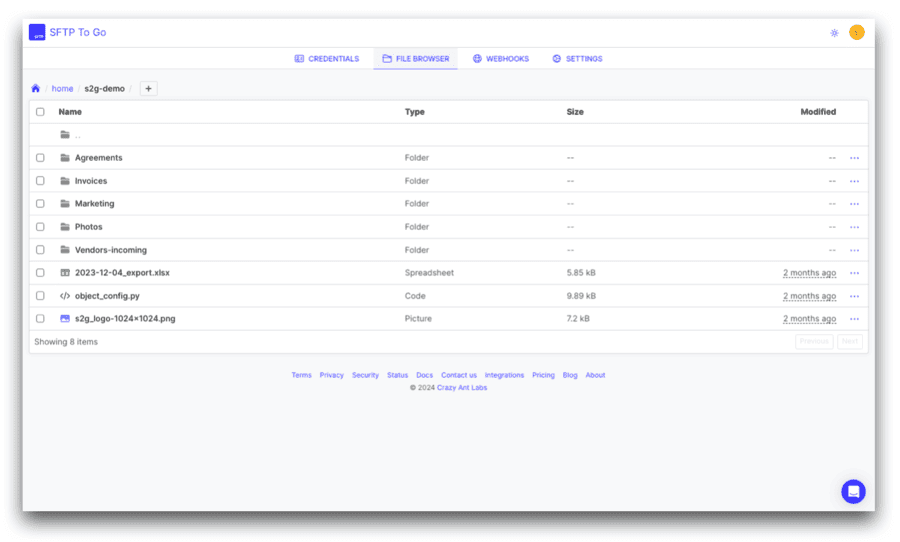
This is one of the biggest differences between managed cloud SFTP and ad hoc file sharing. Instead of sending files around loosely, teams can build a structured file exchange environment with strict oversight and auditability.
For more on permissions and auditability, see permission options and audit logs.
Audit logs and activity visibility
Audit logs help teams answer key questions after a file moves.
For example:
- Who uploaded this file?
- Who downloaded it?
- When did access happen?
- Did a login fail?
- Was access denied?
- Who deleted a file?
- What admin events took place?
- Which credential touched this folder?
- Did a webhook fail?
- Are file activity records available for review?
SFTP To Go provides audit logs for admin, file, and access activity. Those records support compliance with frameworks and regulations like HIPAA, GDPR, GLBA, FERPA, DORA, SOC 2 and others, along with troubleshooting, security reviews, customer support, compliance processes, and internal reporting.
Newer SFTP To Go updates also support audit log streaming on eligible plans, helping teams connect file activity to SIEM and observability systems. For more on the latest visibility features, see audit log streaming, webhook retries, and usage metrics.
Automation with file automations, APIs, webhooks, and notifications
Cloud SFTP is more useful to business workflows when file activity can trigger the next step. SFTP To Go supports automation and workflow notifications through:
- Native file automations for event- or schedule-triggered workflows that can move, copy, delete, PGP encrypt or decrypt files, create files or folders, add delays, send notifications, or trigger webhooks
- REST API access for managing credentials, SSH keys, webhooks, Share links, audit logs, and audit log exports
- Webhooks for triggering external workflows after file uploads, directory creation, downloads, or deletions
- SFTP and FTPS clients for scripted, scheduled, or system-to-system transfers
- S3 API access on eligible plans for programmatic access to storage
- Email, Slack, and Microsoft Teams notifications for human-facing file activity alerts
- iPaaS and integration platforms that connect through SFTP, FTPS, HTTPS, webhooks, API, or S3-compatible access
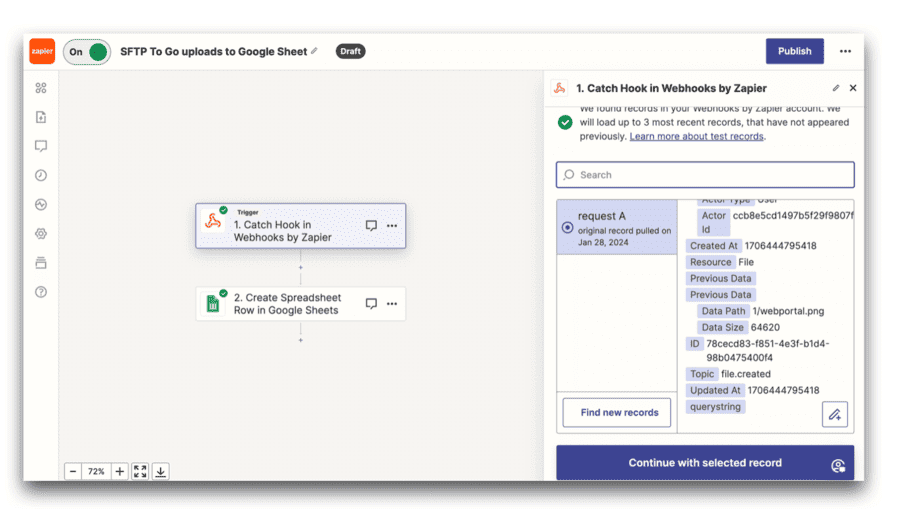
That lets routine file-level processing stay inside the managed transfer environment, while APIs, webhooks, and integration platforms handle workflows that need to extend into other systems. A vendor upload can be moved or copied automatically, an incoming PGP file can be decrypted before the next step, a customer download can trigger a notification, or a completed file workflow can send a webhook to an application, EDI platform, database, or other business system.
SFTP To Go’s August 2026 updates introduced these native file automation capabilities.
For workflow ideas, see secure file transfer automation for regulated workflows.
Web portal access for non-technical users
Not everyone wants to (or can) use an SFTP client.
Finance teams, operations users, healthcare administrators, customer support teams, vendors, clients, and external partners may need secure file access through an intuitive browser interface.
SFTP To Go’s HTTPS web portal gives users a browser-based way to work with files, securely and from anywhere. Depending on their permissions, users can upload, download, delete, move, copy, and share files.
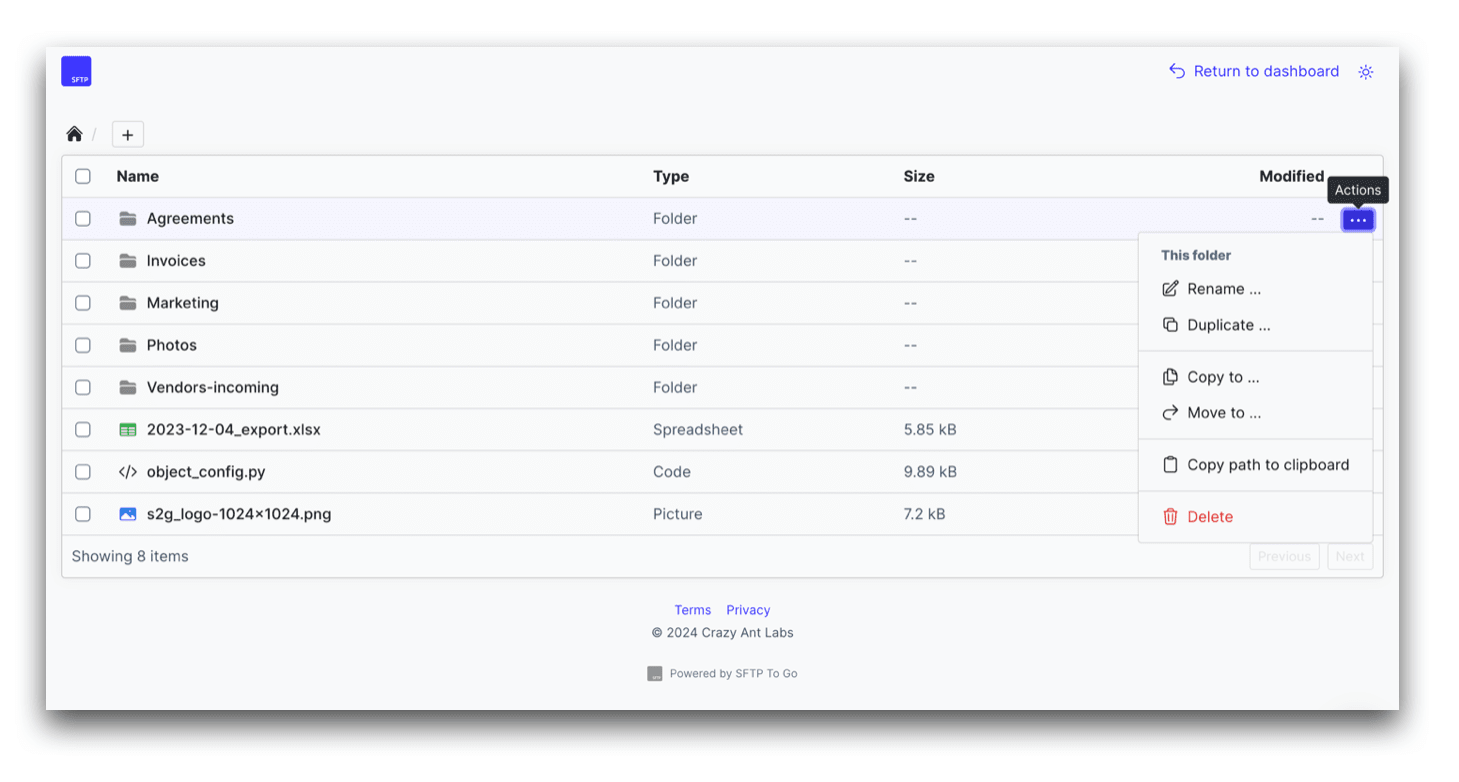
This is vital as real file workflows often involve both technical and non-technical users. A developer may connect through SFTP, FTPS, scripts, or APIs. A finance user may prefer to work through the web portal. A vendor may upload to a restricted folder. A customer may receive a Share link, etc.
All of those access patterns can sit inside one managed file transfer environment. For more on browser-based access, see the SFTP To Go web portal announcement.
Share links for controlled link-based delivery
Cloud SFTP is often associated with protocol access, but not every file needs an SFTP client. SFTP To Go also supports Share links for controlled link-based delivery, with customizable expiry and permissions.
Share links give teams a browser-friendly way to share files or folders by link while still keeping the wider managed file transfer environment in place.
Depending on the setup, Share links can support controls like:
- Password protection
- Expiration
- Download limits
- Revocation
- Activity visibility
That gives teams a practical way to do one-off shares with partners, vendors and clients, without moving sensitive workflows into a separate, disconnected file-sharing tool.
For more context, see secure Share links for file sharing.
MFA, SSH keys, and access restrictions
A secure cloud SFTP service should support strong authentication and access control.
SFTP To Go supports SSH key authentication for SFTP, password authentication where appropriate, MFA for web portal access, SAML SSO for admin users on eligible plans, and inbound network rules on eligible plans.
These controls help reduce risk around unauthorized access.
They’re especially important when files include customer data, financial documents, healthcare data, EDI files, confidential reports, or regulated records.
For a product update focused on MFA, see enforcing MFA for credentials.
Custom domains and branding
File exchange may be an internal, partner-facing or customer-facing process.
That means the user experience should be clean and brand-conscious.
SFTP To Go supports custom domains and branding options on eligible plans, helping teams present a more consistent file exchange experience to partners, customers, vendors, and internal users.
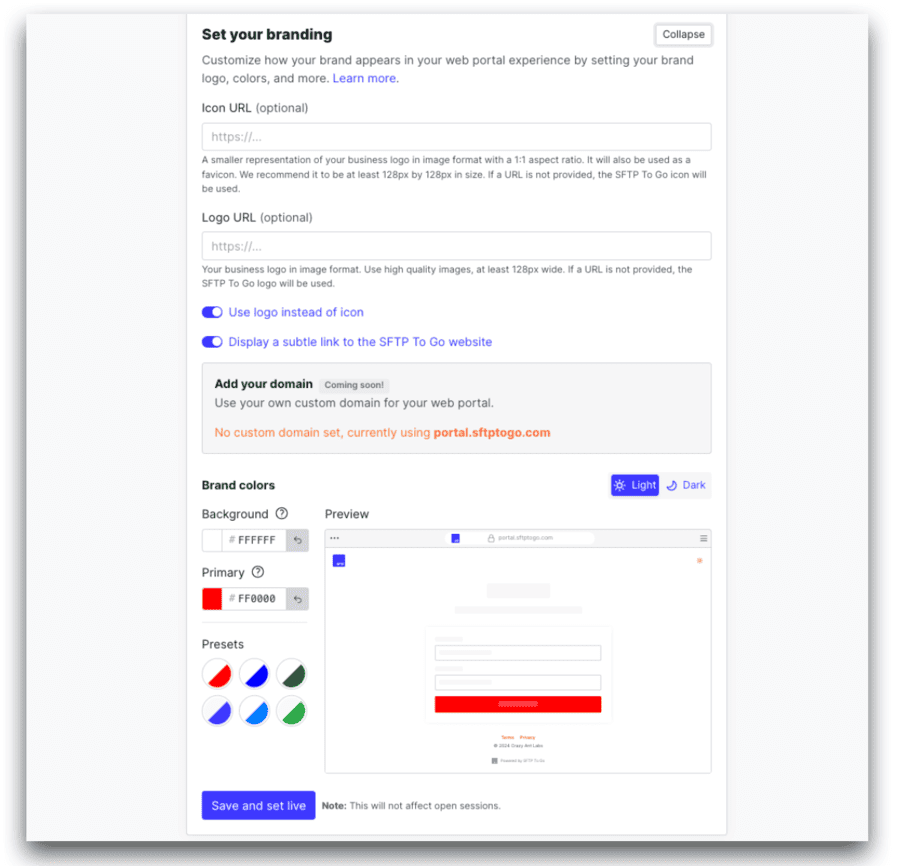
A branded portal or custom SFTP/FTPS domain can make a workflow feel more professional and easier to recognize.
That’s useful when file transfer is part of regular operations rather than a one-off send.
High availability and business continuity
File transfer tends to be business-critical. If an EDI file, finance report, vendor upload, claims file, or operational export doesn’t arrive, the wider process can stall.
Managed cloud SFTP helps reduce the infrastructure risk that comes with self-hosted transfer servers. Instead of relying on a server your team has to patch, monitor, scale, and recover, a managed provider handles the service environment and storage foundation.
SFTP To Go is built on AWS infrastructure and Amazon S3-backed storage, helping teams support reliable file exchange without maintaining transfer infrastructure themselves.
For regulated environments, see cloud MFT for regulated industries.
Compliance support
Cloud SFTP doesn’t make a business compliant by itself. Compliance depends on configuration, contracts, access policies, retention practices, audit processes, vendor controls, and internal procedures.
What a managed cloud SFTP service can do is give teams stronger controls around sensitive file exchange. SFTP To Go helps teams protect files in transit and at rest, restrict access by user, folder, home directory, and inbound network rule, and review file and login activity through audit logs.
These controls support GDPR, HIPAA, FERPA, GLBA, and DORA-aligned workflows, among others, while SOC 2 Type II reporting and HIPAA BAA support on eligible plans help with vendor review and regulated data exchange.
For framework-specific guidance, see GLBA compliance for secure file transfer in financial services, FERPA compliance with cloud SFTP, Is SFTP compliant? HIPAA, GDPR, SOC 2, and DORA, and 2026 data compliance changes for sensitive file transfer.
For a wider compliance-focused MFT overview, see managed file transfer for SOC 2, GDPR, and HIPAA.
What to look for in a cloud SFTP provider
Cloud SFTP providers and packages vary widely. Basic SFTP access is only the starting point. A strong provider should support the regulations, controls and workflows that surround file transfer.
Look for:
- Managed SFTP and FTPS
- HTTPS web portal access
- Cloud storage
- S3-compatible access where needed
- User and folder permissions
- Home directory restrictions
- SSH key authentication
- MFA for browser access
- Network access controls
- Audit logs and SIEM streaming
- Audit log exports
- Native file automations
- REST API access
- Notifications
- Share links
- Custom domains
- Branding options
- Support for regulated workflows
- Scalable plans
The goal is not just to transfer files, but to run secure file workflows that your team can manage, review, automate, and trust. SFTP To Go brings all of these features in one cloud SFTP service.
Example cloud SFTP workflows
- Vendor file uploads: A supplier, agency, contractor, or external partner uploads files to a restricted folder through SFTP, FTPS, or the web portal. Your team can receive a notification when the file arrives, review it, and move it into the right internal process.
- Finance file exchange: Finance teams can exchange payment files, reconciliation reports, remittance files, statements, and other sensitive documents with banks, processors, insurers, customers, or vendors. Audit logs help confirm who accessed each file and when. For a finance-specific example, see financial EDI with managed SFTP.
- Healthcare document transfer: Healthcare teams can use managed cloud SFTP to exchange sensitive operational files or PHI-related documents with labs, billing teams, payers, vendors, or internal departments. Permissions, audit logs, MFA for browser access, and HIPAA BAA support on eligible plans help support the wider compliance process. For a healthcare-specific example, see healthcare EDI with managed SFTP.
- EDI file workflows: EDI platforms can handle mapping, translation, validation, acknowledgments, and trading partner requirements, while SFTP To Go supports the secure file exchange around those steps: file pickup, file delivery, partner folders, storage, permissions, and activity records. For more detail, see SFTP for EDI.
- SaaS customer file workflows: SaaS teams may need to receive customer exports, deliver reports, provide pickup folders, or move files between customers, support teams, data teams, and internal systems. Cloud SFTP gives them a controlled file exchange environment without building and maintaining transfer servers. For related automation ideas, see secure file transfer automation for regulated workflows.
- Cloud backup and sync workflows: Teams can use SFTP as part of backup, sync, or file access workflows when files need to move between cloud storage, shared drives, business systems, or external partners. For a practical example, see SFTP Google Drive Sync.
Setting up managed cloud SFTP with SFTP To Go
Getting started with SFTP To Go is surprisingly quick and easy:
- Choose a plan based on storage, credentials, bandwidth, and business needs.
- Create credentials for users, partners, vendors, applications, or systems.
- Set home directories so each credential only reaches the right storage path.
- Apply permissions for upload, download, delete, or restricted access.
- Choose protocols such as SFTP, FTPS, HTTPS web portal access, or S3 API access on eligible plans.
- Add security controls such as SSH keys, MFA for web portal access, and inbound network rules where needed.
- Set up file automations, notifications, or webhooks based on what should happen when files arrive, are processed, or need to connect to another system.
- Use audit logs to monitor access and support review processes.
Initial set up takes minutes, but the goal is to set it up properly from the start, so the workflow can grow without becoming risky, messy, or difficult to audit.
For teams building automation around transfer events, see SFTP automation.
Ready for managed cloud SFTP and storage?
Managed cloud SFTP goes further than secure file transfer. It gives teams secure protocols, cloud storage, access controls, logs, automation, browser access, Share links, and support without the infrastructure burden of running SFTP servers themselves.
SFTP To Go is built for businesses that need secure file exchange across users, partners, systems, and workflows. It supports managed SFTP, FTPS, HTTPS web portal access, Amazon S3-backed storage, S3 API access on eligible plans, native file automations, REST API access, webhooks, notifications, Share links, audit logs and SIEM streaming, and security controls for business file transfer.
If your team needs secure file transfer without server maintenance, SFTP To Go gives you a managed cloud SFTP environment that’s ready to support secure file operations across users, partners, and systems.
Frequently asked questions
What is cloud SFTP?
Cloud SFTP is SFTP hosted in a cloud environment. Instead of running your own SFTP server, you use a managed cloud service that provides secure SFTP access, cloud storage, user controls, permissions, audit logs, and related file transfer features.
What is managed cloud SFTP?
Managed cloud SFTP is a cloud SFTP service where the provider handles the server infrastructure, maintenance, storage environment, availability, and platform operations. Your team manages the users, credentials, folders, permissions, integrations, and file workflows.
Is cloud SFTP secure?
Cloud SFTP can be secure when it is configured with strong authentication, encrypted transfer, encrypted storage, restricted access, user and folder permissions, audit logs, MFA for browser access, and network controls where needed. Security also depends on how the organization manages credentials, users, policies, and file handling procedures.
How is cloud SFTP different from self-hosted SFTP?
With self-hosted SFTP, your team runs and maintains the server, storage, patching, backups, monitoring, and security hardening. With managed cloud SFTP, the provider handles the service infrastructure while your team manages access, folders, permissions, automation, and business workflows.
What are the benefits of managed cloud SFTP?
Managed cloud SFTP can reduce server maintenance, improve secure file exchange, centralize storage, support user and folder permissions, provide audit logs, enable automation through APIs and webhooks, support browser access, and help teams scale file workflows without managing transfer infrastructure themselves.
Does SFTP To Go support cloud storage?
Yes. SFTP To Go uses Amazon S3-backed storage for managed cloud file transfer workflows. It also supports S3 API access on eligible plans, giving teams more flexibility when they need programmatic storage access.
Can SFTP To Go be used without an SFTP client?
Yes. SFTP To Go supports HTTPS web portal access, so users can upload, download, delete, move, copy, and share files through a browser, depending on their permissions. This helps non-technical users work with files without using an SFTP or FTPS client.
Does SFTP To Go support Share links?
Yes. SFTP To Go supports Share links for controlled link-based delivery. Share links can help teams share files or folders through a browser-friendly link while still using the wider managed file transfer environment.
Can managed cloud SFTP support automation?
Yes. Managed cloud SFTP can support automation through SFTP or FTPS clients, scheduled scripts, REST APIs, webhooks, notifications, S3-compatible access on eligible plans, and iPaaS tools that connect to the file transfer environment.
Who should use managed cloud SFTP?
Managed cloud SFTP is useful for businesses that exchange files with partners, vendors, customers, systems, or internal teams and need secure transfer, controlled access, audit logs, automation, cloud storage, and less infrastructure maintenance.