

SFTP SaaS vs. hosted SFTP: what’s the difference?
Have you ever heard the phrase “same, but different”?
It’s not the worst description of hosted SFTP, SFTP SaaS, SFTP as a service, SFTP hosting, and cloud SFTP service.
These terms often point to the same basic promise: secure file transfer over SFTP without building everything from zero. But they don’t always describe the same service model.
The real difference is not the protocol. SFTP is still SFTP. The difference is who owns the infrastructure, how much the provider manages, what extra interfaces are included, and how much work your team has to do after sign-up.
That distinction matters more than the label. A basic hosted SFTP server and a managed SFTP SaaS platform may both let you connect with an SFTP client, but the day-to-day experience can be very different.
One may give you a server. The other may give you a secure file transfer service with storage, access controls, audit logs, APIs, webhooks, browser access, FTPS, S3 storage, and support built around it.
Same protocol. Very different operating model.

What is hosted SFTP?
Hosted SFTP usually means an SFTP server hosted by a provider instead of your own team.
That can be useful. You don’t have to rack hardware, provision a VM in your own account, or expose an on-prem server to external partners. The provider runs the hosting environment, and you connect to the server over SFTP.
But hosted SFTP can still feel close to infrastructure. You may still think in terms of a server, storage allocation, users, ports, availability, backups, firewall rules, and support boundaries.
That doesn’t make hosted SFTP bad. It just means the provider may be selling hosted infrastructure rather than a fully managed file transfer product.
Hosted SFTP is usually closer to this model:
- A hosted server
- SFTP access
- Storage tied to the hosted environment
- Some provider-managed infrastructure
- More customer involvement in operations and workflow design
For some teams, that’s enough. If you only need a simple endpoint for periodic file exchange, hosted SFTP may do the job.
But if you need partner separation, audit history, multiple access methods, API automation, event triggers, and a storage model that can grow with the workflow, the label “hosted SFTP” alone isn’t what you’re looking for.
What is SFTP SaaS?
SFTP SaaS, or SFTP as a service, treats secure file transfer as a managed software service rather than a server you have to think about.
You still connect using SFTP clients and iPaaS automation tools. Your partners can still upload and download files. Your systems can still move files on a schedule. But the service is designed so you don’t need to care which server, instance, operating system, or disk sits behind it.
That’s the point. You want to log in, create credentials, assign folders, exchange files, monitor activity, and automate workflows without managing the transfer infrastructure yourself.
A strong SFTP SaaS platform should usually provide:
- Fast sign-up and access
- Managed SFTP endpoints
- Secure cloud storage
- User and credential management
- Folder-level separation
- Audit logs
- APIs for automation
- Webhooks for file events
- Support for common access methods beyond SFTP
- Provider-managed availability and maintenance
The best way to understand SFTP SaaS is this: the SFTP server is not the product. The managed file transfer service around it is the product.
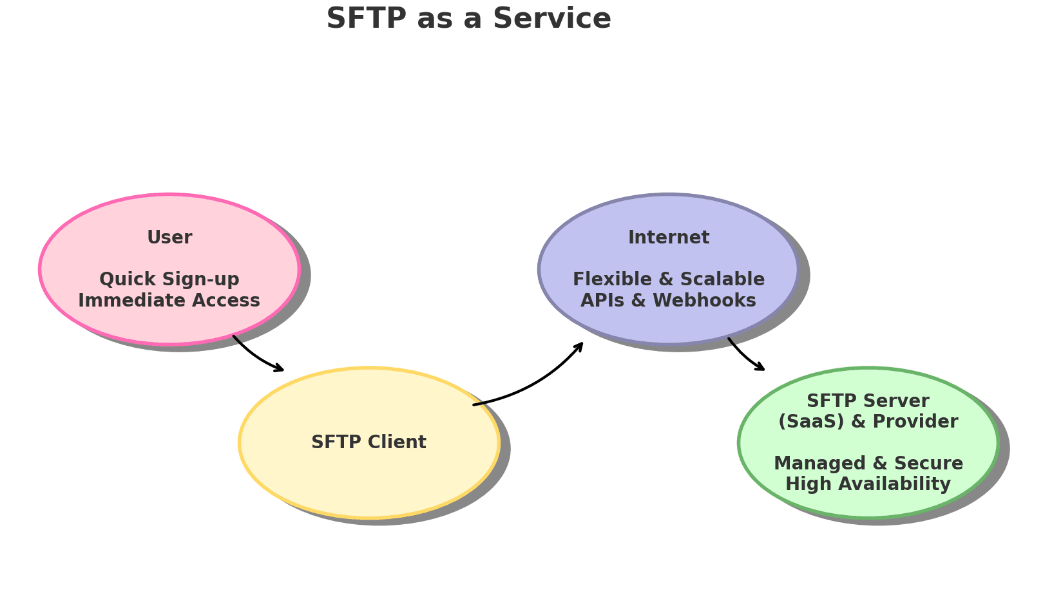
Hosted SFTP, on the other hand, lends itself to the notion of IaaS (infrastructure as a service), where you gain access to a server, hosted by the provider’s data centers.
What is cloud SFTP?
Cloud SFTP is secure file transfer over SFTP using cloud-hosted infrastructure instead of a server your team runs on-premises.
The term can describe several service models. Sometimes it means a hosted SFTP server running in a cloud environment. Sometimes it means a fuller SFTP SaaS or managed file transfer service with cloud storage, access controls, audit logs, APIs, webhooks, FTPS, S3 access, and browser-based file handling.
That’s why “cloud SFTP” is useful, but not always precise. The important question is what sits behind the SFTP endpoint.
A basic cloud SFTP service may give you:
- An SFTP endpoint
- Cloud-hosted storage
- Basic user access
- Provider-managed hosting
A stronger SFTP SaaS platform should give you more.
So, cloud SFTP tells you where the service runs. SFTP SaaS tells you more about how much of the file transfer workflow the provider manages.
Hosted SFTP vs SFTP SaaS: the differences
The difference between hosted SFTP and SFTP SaaS (which is similar to MFT, managed file transfer) comes down to responsibility.
With hosted SFTP, the provider may host the server, but the customer can still carry more of the operational work. That may include user management, access design, monitoring, evidence collection, integration logic, backup expectations, and workflow setup.
With SFTP SaaS, the provider takes more ownership of the service layer. The customer manages who should access files and what the workflows need to do, while the provider handles the infrastructure and service capabilities that make the file exchange and security work.
A simple way to separate them:
- Hosted SFTP gives you access to an SFTP environment.
- SFTP SaaS gives you a managed file transfer (MFT) service built around SFTP.
If all you can do is connect to an SFTP endpoint, you may be looking at hosted SFTP. If you also get managed storage, web portal access, FTPS, S3 access, audit logs, APIs, webhooks, folder isolation, and account-level controls, you’re closer to SFTP SaaS.
Setup and onboarding
Setup is where the difference shows up clearly.
With hosted SFTP, onboarding may still involve waiting for a server or environment to be provisioned. You may need to coordinate host details, storage limits, users, directories, firewall access, and operational handoff before the service is ready.
With SFTP SaaS, the expectation is faster access. You sign up, create credentials, assign permissions, connect over SFTP, and start moving files.
You don’t need to know whether there’s a VM, a container, a cluster, or something else behind the service. Frankly, that should not be your problem.
The user expectation is simply:
- Create an account
- Create credentials
- Assign access and permissions
- Connect over SFTP
- Start exchanging files
- Add automation when needed via event triggers and API
That’s the SaaS state of mind. The service should be ready to use without making you manage the parts that don’t belong in your workflow.
Ownership and responsibility
This is the center of the comparison.
Hosted SFTP can reduce infrastructure work, but it doesn’t always remove operational responsibility. Your team may still need to define access patterns, monitor activity, manage partner folders, build automation, and keep evidence for audits or troubleshooting.
SFTP SaaS shifts more of that responsibility into the product.
You still decide who gets access, what files should move, what partners need, and which systems should process the files via SFTP automation. But the service should reduce the infrastructure work around those decisions.
The provider should handle more of the file transfer foundation:
- Transfer infrastructure
- Storage availability
- Protocol endpoints
- Security defaults
- Platform maintenance
- Access-control tooling
- Logging capabilities
- API and webhook support
- Scaling behavior
- Service availability
The customer should focus on the business workflow:
- Which partners need access
- Which folders they can use
- Which systems send or collect files
- Which files need retention
- Which events should trigger automation
- Which logs need review or export
That division is what makes SFTP SaaS more synonymous with MFT, and different from a hosted box with SFTP installed.
Scaling storage, users, and connections
SFTP usage rarely stays the same over time, especially in a growing company.
A few files can turn into recurring batch uploads. One user can become many credentials across suppliers, customers, applications, and internal teams.
With hosted SFTP, scaling may still feel tied to the server model. More storage, more users, more concurrent connections, or higher transfer volume can mean a plan change, a migration, a larger instance, or a support request.
With SFTP SaaS, scaling should feel less like moving to a bigger box and more like adjusting the service around the workflow.
You should expect flexibility around:
- Storage growth
- User and credential count
- Partner folder separation
- Concurrent connections
- Transfer volume
- Access methods
- Automation needs
- Logs and review workflows
This doesn’t mean every plan is unlimited. It means the service should be designed around changing file-transfer needs, not around the mental model of one server and one storage ceiling.
Access methods: SFTP, FTPS, S3, and web portal access
A hosted SFTP service may give you SFTP and stop there. SFTP SaaS usually needs to do more, because modern file exchange is rarely one-protocol-only (see enterprise MFT) . In sprawling networks in healthcare and finance, for example, flexibility is everything, but so is security.
Automated systems may use SFTP. Some partners may need FTPS. Developers or cloud workflows may need S3 access. Non-technical users may need a web portal. Admins may need a dashboard for credentials, folders, network rules, and file activity.
A more complete SFTP SaaS setup may include:
- SFTP for automated secure file transfer
- FTPS for FTP-compatible workflows that need TLS-secured transport
- S3 access for cloud-centered workflows
- HTTPS web portal access for browser-based file handling
- Admin tools for users, credentials, folders, and policies
That flexibility is one of the main reasons the SaaS label (or the MFT managed file transfer label) is one to look for. The product is not just a protocol listener. It’s a controlled access, storage, and transfer system for file exchange across humans, systems, and partners.
Automation and application interfaces
Hosted SFTP often leaves automation around the edges. Your team may need to poll folders, write scripts, check for new files, pull logs manually, or build custom handling for every recurring partner workflow.
SFTP SaaS and MFT should make file activity easier to act on. APIs can help manage integrations, users, credentials, permissions, and logs. Webhooks can notify another system when a file is uploaded, downloaded, or deleted.
Useful automation features include:
- APIs for integration, users, credentials, permissions, and audit log export
- Native file automations for file-level processes such as move, copy, delete, PGP encryption or decryption, and notifications
- Webhooks for upload, download, and delete events
- File activity records that can be sent to monitoring, reporting, or system-of-record tools
- Event signals that downstream systems, internal apps, or iPaaS platforms can act on
- Repeatable partner onboarding without rebuilding the same scripts each time

The point is not to turn the SFTP product into your whole workflow engine. File-level processes that don’t require another system can stay inside the managed file transfer environment, while workflows involving third-party systems, business applications, approvals, reporting, or broader processing can continue through an iPaaS or integration platform.
A strong SFTP SaaS service should therefore be able to act on file activity directly where appropriate, while still exposing reliable events and APIs when the workflow needs to extend into other systems.
Security, access control, and auditability
SFTP encrypts data in transit over SSH. That is the foundation, not the whole security story.
For real business file exchange, you also need to think about who can connect, where they land, which folders they can see, how credentials are managed, whether web access uses MFA, whether network access can be restricted, and what gets logged.
A mature SFTP SaaS service should help with:
- SSH public key authentication
- Strong credential policies
- MFA for web portal access
- Folder-level permissions
- Chrooted home directories
- Inbound network rules
- Static host endpoints for allowlisting
- Encryption in transit
- Encryption at rest
- Audit logs for login and file activity
Those controls are especially important when external partners, regulated workflows under HIPAA, GDPR, GLBA, FERPA, and SOC 2, or recurring business files are involved.
Hosted SFTP can support some of this, depending on the provider. But with SFTP SaaS or MFT, these features should be part of the streamlined product experience, not a custom project every time a new partner shows up.
Availability and business continuity
If your transfer partners rely on SFTP to send orders, invoices, claims, reports, backups, or operational data, downtime can be a serious problem. So, who is responsible when the service fails, files are deleted, storage fills up, or a transfer issue blocks a workflow?
With hosted SFTP, availability depends on the hosting model and support terms. With SFTP SaaS, users should expect the provider to own more of the service availability, storage architecture, maintenance, and recovery support.
That doesn’t remove the customer’s responsibility for file retention policies, partner processes, or workflow design. But it should reduce the amount of infrastructure work required to keep transfers running.
For business continuity, ask:
- What uptime does the service target?
- How is storage protected?
- How are files backed by cloud storage?
- What audit logs are available?
- Can logs be exported?
- What happens after accidental deletion?
- How does support handle transfer failures?
- Can transfers pick up where they left off, if interrupted?
- Can automation help detect or route file events?
This is where SFTP SaaS should feel different from a hosted server. The provider is not just giving you a login endpoint. It’s helping keep the file transfer service usable, reviewable, and supportable.
Which is better, hosted SFTP or SFTP SaaS / MFT?
A hosted SFTP offer may be enough if you need a simple endpoint, basic storage, a small number of users, and very little automation.
SFTP SaaS is the better fit when you need managed SFTP and FTPS, S3 access, web portal access, secure cloud storage, partner folder separation, MFA, SSH key authentication, audit logs, APIs, webhooks, and less transfer-server maintenance.
That is the real distinction. Hosted SFTP gives you access to a hosted transfer environment. SFTP as a service should give you a managed file transfer product you can build workflows around.
| Question | Hosted SFTP | SFTP SaaS / SFTP as a service / MFT |
|---|---|---|
| What are you buying? | A hosted SFTP endpoint or environment. | A managed file transfer service built around SFTP. |
| How much do you manage? | You may still handle more setup, access design, monitoring, and workflow work. | The provider should handle more of the service layer, storage, maintenance, and availability. |
| How fast is setup? | Setup may involve provisioning, folders, users, firewall rules, and handoff. | You should be able to create credentials, assign access, connect, and start moving files quickly. |
| What access methods are included? | Often SFTP only, depending on the provider. | May include SFTP, FTPS, S3 access, HTTPS web portal access, APIs, and webhooks. |
| How does automation work? | You may need polling, scripts, manual checks, or custom glue. | APIs, webhooks, audit logs, and file events can expose activity to other systems. |
| When is it enough? | When you only need a simple endpoint, basic storage, and limited automation. | When you need transfer, storage, access control, auditability, automation, and less server maintenance. |
How SFTP To Go approaches SFTP as a service
SFTP To Go is a cloud SFTP service built around the SFTP SaaS / MFT model: secure file transfer as a managed service, not a server you have to maintain.
It supports SFTP, FTPS, S3 access, secure cloud storage, HTTPS web portal access, SSH public key authentication, MFA for web access, credential-level permissions, chrooted home directories, inbound network rules on eligible plans, static host endpoints, encryption in transit, encryption at rest, audit logs, native file automations, APIs, and webhooks.
That means teams can use familiar transfer protocols while getting the managed system around them:
- Partner and workflow separation at the folder level
- Configurable access controls
- Secure file storage
- Browser-based access when needed
- Native, file-level, and programmatic automation
- File activity records
- Event-driven notifications
- Less infrastructure maintenance
You still decide your users, folders, partners, retention rules, and automation logic. SFTP To Go gives you the transfer foundation without making your team run the server, storage layer, access model, and event plumbing from scratch.
We’re definitely not saying that every hosted SFTP provider is bare-bones. The point is: the terms overlap, but they don’t always describe the same level of service. If you need secure transfer, cloud storage, access controls, audit logs, APIs, and webhooks in one managed setup, you’re looking for more than a hosted SFTP endpoint.
Frequently asked questions
What is SFTP SaaS?
SFTP SaaS is secure file transfer delivered as a managed software service. You connect over SFTP, create users or credentials, assign folder access, exchange files, and often get added features such as cloud storage, audit logs, APIs, webhooks, and browser access without maintaining the transfer server yourself.
What is hosted SFTP?
Hosted SFTP usually means an SFTP server or SFTP environment hosted by a provider. It can reduce infrastructure work, but it may still leave more responsibility with the customer for user management, workflow design, monitoring, automation, and operational setup.
Is SFTP SaaS the same as hosted SFTP?
Not always. Hosted SFTP usually focuses on providing an SFTP endpoint or hosted server. SFTP SaaS usually describes a more complete managed file transfer service with storage, access controls, audit logs, APIs, webhooks, and other tools around the SFTP protocol.
What is SFTP as a service?
SFTP as a service is a managed file transfer model where the provider runs the SFTP infrastructure and service layer. The customer manages users, credentials, folders, and workflows, while the provider handles the transfer environment, maintenance, storage architecture, and platform capabilities.
What is cloud SFTP?
Cloud SFTP is secure file transfer over SFTP using cloud-hosted infrastructure instead of an on-premises server. It can mean a basic hosted SFTP endpoint, or it can describe a fuller SFTP SaaS platform with cloud storage, access controls, audit logs, APIs, webhooks, FTPS, S3 access, and browser-based file handling.
Is SFTP SaaS the same as MFT?
Not exactly. MFT, or managed file transfer, is the broader category. It usually refers to managed file exchange with access controls, audit logs, automation, security policies, and support for recurring business workflows.
SFTP SaaS is more specific. It describes secure file transfer over SFTP delivered as a managed software service. An SFTP SaaS platform starts to overlap with MFT when it adds managed storage, FTPS or S3 access, folder controls, audit logs, APIs, webhooks, and partner workflow support around the SFTP protocol.
What should an SFTP SaaS platform include?
An SFTP SaaS platform should include managed SFTP access, secure cloud storage, credential and folder management, encryption in transit, encryption at rest, audit logs, and support for automation. Many services also provide FTPS, S3 access, web portal access, APIs, webhooks, MFA, and network access controls.
When should you choose hosted SFTP?
Hosted SFTP may be enough when you only need a simple SFTP endpoint, basic storage, a small number of users, and limited automation. It can work well for simpler file exchange needs where partner access, auditability, and integration requirements are modest.
When should you choose SFTP SaaS?
Choose SFTP SaaS when you need managed secure file transfer with storage, access control, automation, audit logs, APIs, webhooks, and support for external partners or recurring workflows. It is usually the better model when your team wants less transfer-server maintenance and more product-level control.
Does SFTP SaaS support automation?
Yes, a strong SFTP SaaS platform should support automation through APIs, webhooks, or both. APIs can help manage users, credentials, permissions, and logs, while webhooks can notify downstream systems when file events occur.
Is SFTP SaaS secure?
SFTP SaaS can be secure when it includes strong authentication, encrypted transport, encryption at rest, access controls, audit logs, network restrictions, and responsible provider operations. The SFTP protocol protects data in transit, while the managed service should add the surrounding controls needed for real business use.
How does SFTP To Go support SFTP SaaS?
SFTP To Go supports SFTP SaaS with managed SFTP, FTPS, S3 access, cloud-backed storage, HTTPS web portal access, SSH public key authentication, MFA for web access, credential-level permissions, chrooted home directories, inbound network rules, audit logs, APIs, and webhooks.