
In December 2025, we introduced mandatory MFA for all Admin users to better protect management actions and help regulated industry users ensure compliance. Now, we’re expanding that control in a practical way.
This update is small, but it significantly reduces risk.
What’s changing?
Admins can now require MFA enrollment for credentials accessing SFTP To Go through the web portal.
This enforcement is about browser sign-ins to the web portal. It doesn’t change how non-browser clients authenticate for SFTP and FTPS connections.
Why this matters
Web portal sign-in is a higher-risk access point. When a credential can log in via a browser, it becomes a target for common identity attacks like phishing and credential stuffing, and it’s more likely to be impacted by password reuse.
MFA enforcement is optional, but it gives you a clean way to standardize web portal access when you need it. Instead of relying on each user to opt in, Admins can choose to require MFA enrollment for web portal credentials, which reduces the chance that a single stolen password turns into an account takeover.
This is especially useful when credentials are shared with external partners, or tied to sensitive or regulated data workflows.
How to Enforce MFA for all SFTP To Go Web Portal users
There’s now a “Require MFA For All Users” toggle under your organization’s security settings. When it’s enabled, credentials signing in to the web portal will be prompted to enroll in MFA.
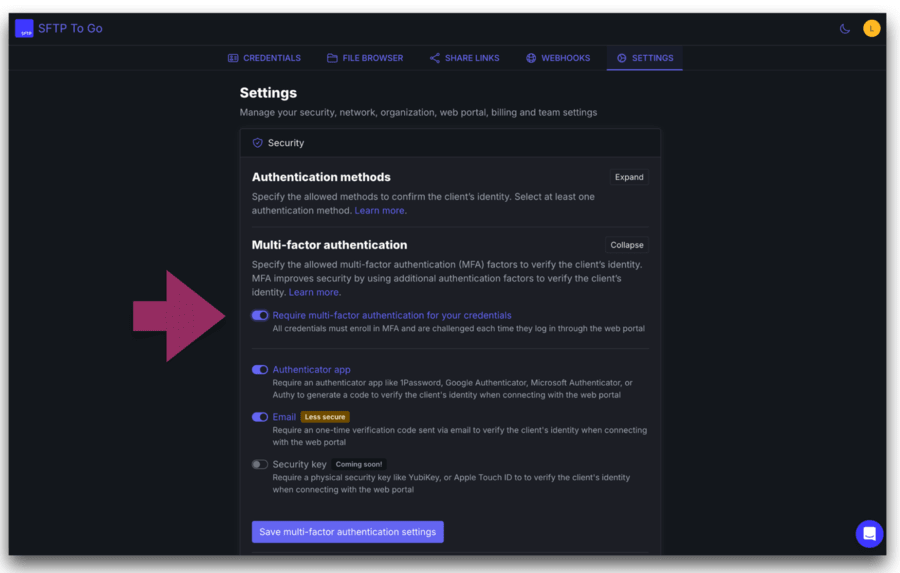
- Go to your SFTP To Go admin dashboard.
- Open Settings, then Security, then Multi-factor Authentication.
- Enable at least one factor (Authenticator App and or Email).
- Toggle Require MFA for all users on.
- If you’re allowing Email OTP, make sure the relevant credentials have associated email addresses before you enforce it.
Learn more about MFA and organizational settings Here.
MFA factors allowed for web portal sign-in:
- Authenticator app OTP: Works with apps like Google Authenticator, 1Password, and Authy. This is the strongest option for most teams.
- Email OTP: Sends a one-time password to the credential’s associated email address. The credential needs to have an associated email address for this one.
- Security Key: Coming soon. Requires a physical security key like YubiKey or Apple Touch ID.
Again…
- Don’t enforce email OTP without email-linked credentials: Users can get prompted for a code they can’t receive.
- Don’t forget to enable a factor: The enforcement toggle won’t do anything unless at least one factor is enabled.
- This setting only affects credentials that sign in to the web portal: Credentials used only for SFTP or FTPS connections won’t be impacted.
Our recent features
This feature is now LIVE, and there’s plenty more to explore. We’ve been rolling out so many new features lately, including:
- Reduce admin tasks with email-associated credentials.
- Enjoy seamless, secure logins with Magic Code.
- Add an extra layer of protection with MFA.
- Share Links
- Download notifications
- Custom domains
- Enhanced file browser and credentials list filtering
- SFTP To Go web portal
These features are all about making sure you have everything you could possibly need to manage your files securely, collaborate seamlessly, and have a great time doing it.
We value your feedback
Have thoughts on how this fits into your workflow? We’re listening!
If you’re using the web portal for internal teams, partner access, or compliance-heavy workflows, tell us what you’d like to see next in credential security and access control.
Drop us a message via the in-app chat with your feedback, ideas, or questions.