
Are self-hosted MFT platforms too much of a hassle for the level of control they offer? And if so, are cloud-native managed file transfer solutions a viable option for companies with strict data policies and complex use cases? Both questions are entirely fair, and the answer is never the same for everybody.
JSCAPE is a great example here. Long-time enterprise customers with dedicated IT teams often praise its reliability. But if your organization runs without that same operational setup, you're likely to hit the setup burdens, maintenance overhead, and usability quirks.
SFTP To Go takes a different approach entirely: a fully managed, cloud-native MFT service that delivers the same enterprise-grade reliability and security, but without the maintenance overhead.
This comparison breaks down the core differences between the two platforms to help you decide which of these options is the right fit for your company.
What sets JSCAPE and SFTP To Go apart
First and foremost, JSCAPE has multiple MFT products: MFT Server, MFT Gateway, and MFT Monitor. Here, we’ll be referring to MFT Server only.
The most important difference between JSCAPE and SFTP To Go lies in the deployment model. While JSCAPE developers call it cloud-native software, it’s fundamentally an on-premises platform adapted to run in the cloud.
Even when you run JSCAPE in a containerized environment via Docker, it’s still up to you to manage orchestration. Moreover, the company officially does not support any issues related to orchestrating JSCAPE with Kubernetes, Docker Swarm, etc.
The SaaS version of JSCAPE looks more like a regular SaaS, but you can’t just sign up for a trial, you still need to talk to a sales rep first. The SaaS version also lacks a few major features of the original, most importantly:
- No IP access controls. In the self-hosted version, you can block or allow specific IP addresses. That feature is simply not available in the SaaS version.
- Some settings are locked down. Things like how data storage is configured, web settings, and REST API settings are restricted. You can see them, but you can't change them freely.
Data locality options in the SaaS version are also somewhat limited: JSCAPE only supports two AWS regions (see below for details).
In comparison, SFTP To Go is built as a cloud-native, fully managed, serverless SaaS that includes cloud object storage and integrates with third-party S3 storage. It doesn’t require any infrastructure maintenance from you.
Round 1: Learning curve & usability
This is typically where the difference between a self-hosted MFT platform and a SaaS is the most evident.
Getting JSCAPE up and running takes time. Based on customer polls, G2 estimates that the average time to implement this platform is around two months. It’s not the software installation process per se. It’s all the contacts with sales reps to get a trial and a quote, infrastructure provisioning, software configuration, and onboarding.
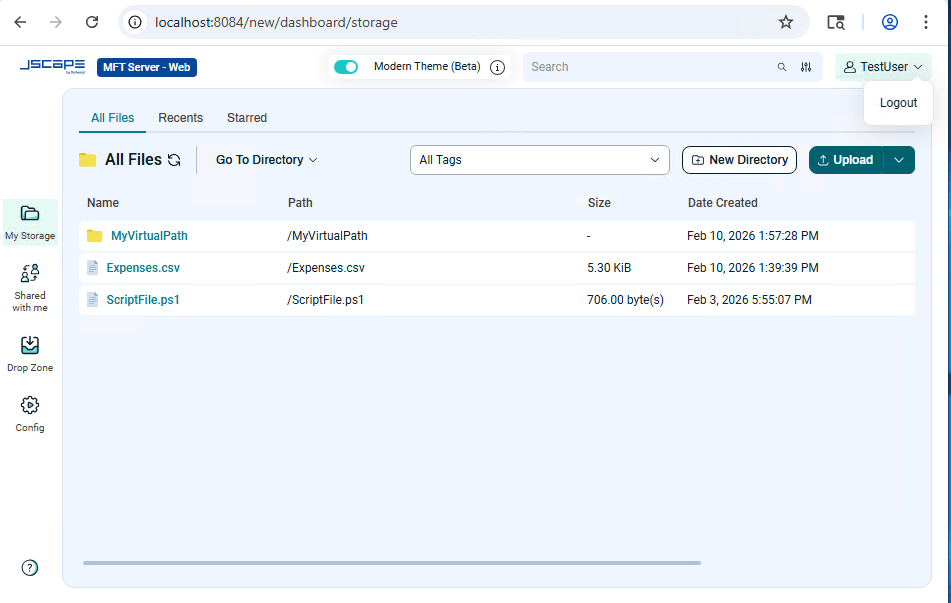
Verified customers point out the following initial hurdles in their reviews on G2: time-consuming setup and configuration, complexity for beginners, and a lengthy upgrade process. For example, various configuration steps to get basic functionality up and running involve launching additional services.
SFTP To Go takes about five minutes to register, pick a region for data storage, copy automatically created credentials, and complete the first test transfer to see how essential features work.
After that, adding new users, creating webhooks, and doing basic management tasks require little ongoing effort and not much specialized expertise. If you can figure out how to create new credentials (one click), what SSH keys are, and where to find the trigger URL for a webhook, you can do the work.
Bottom line: JSCAPE is powerful, but this power comes with a significant time and effort investment to get basic things done. SFTP To Go is very fast to get started with, and it doesn’t stop being straightforward for ongoing maintenance.
Round 2: Security and access control
The main things to track here are data encryption, authorization and authentication, and permission control.
Both platforms support in-transit and at-rest encryption. For JSCAPE, there are multiple ways to do that: you can configure the server to encrypt all files that end up in a specific directory, or you can make encryption part of a processing workflow. Alternatively, you can use native encryption methods if you are using remote storage such as S3. SFTP To Go encrypts everything automatically, as it’s a standard AWS S3 feature.
JSCAPE supports multi-factor authentication via TOTP (e.g., Google Authenticator). However, you need to configure that first and then explicitly enable the "Use multi-factor authentication" option for the specific user or administrator accounts you want to protect.
SFTP To Go enforces 2FA for all admins by default, and enabling it for all users of an organization is a single click in Security preferences.
JSCAPE supports web-based SSO via SAML, OpenID, and OpenID Connect identity providers. However, OpenID is not supported in JSCAPE SaaS. Setting up SSO on JSCAPE is a lengthy multi-step process where you first register and set up a new application in an identity provider’s dashboard and download a SAML certificate, then set up the integration in JSCAPE.
SFTP To Go offers SAML-based SSO with popular identity providers, such as Okta, Entra ID, Google Workspace, and custom SAML and OIDC out of the box. Setting up SSO is just following several on-screen steps.
Both JSCAPE and SFTP To Go follow the principle of least privilege and restrict new users to their own home directories by default, unless set otherwise by an admin.
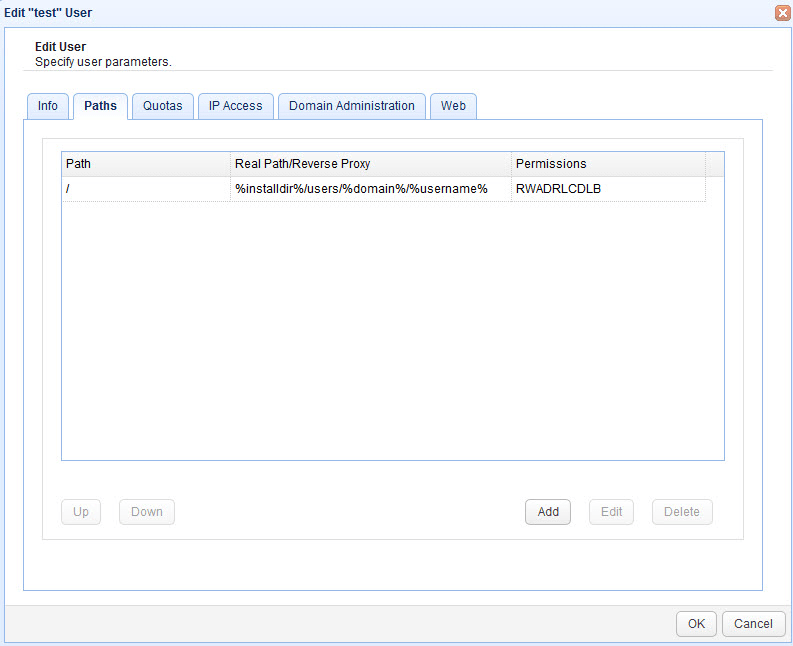
JSCAPE has an advanced permission control system that is a bit cryptic until you learn how to use it:
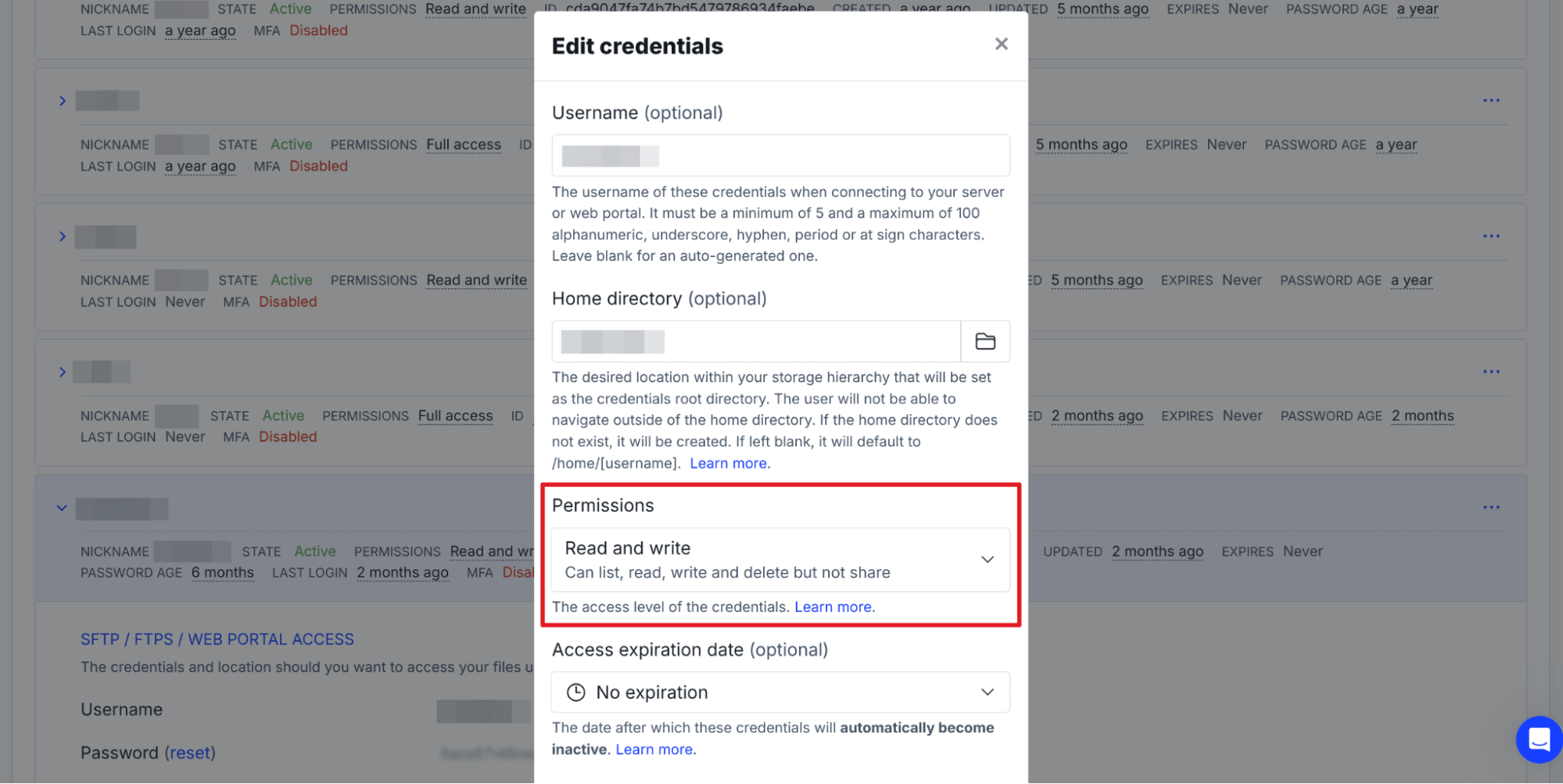
SFTP To Go offers largely the same functionality in a more convenient package:
Both platforms support detailed logging and SIEM integration. JSCAPE keeps administrative logs separately from user activity, while SFTP To Go records dashboard admin actions in its audit logs under the admin principal. On certain plans, those events can also be streamed in near real time to supported SIEM and observability platforms.
Bottom line: JSCAPE gives you fine-grained security controls, but every one of them is opt-in and requires an admin to configure it correctly. SFTP To Go closes those gaps by default: 2FA is already on for all admins, extending it to all users is one click, and enterprise SSO takes a few minutes to set up rather than following a lengthy tutorial.
Round 3: Integrations
JSCAPE MFT server integrates with remote 3rd-party services through what it calls trading partners. Some of the supported services are arbitrary FTP and SFTP servers, Google Cloud, Azure Files, S3 storage, IBM Cloud, Dropbox, Box, and OneDrive.
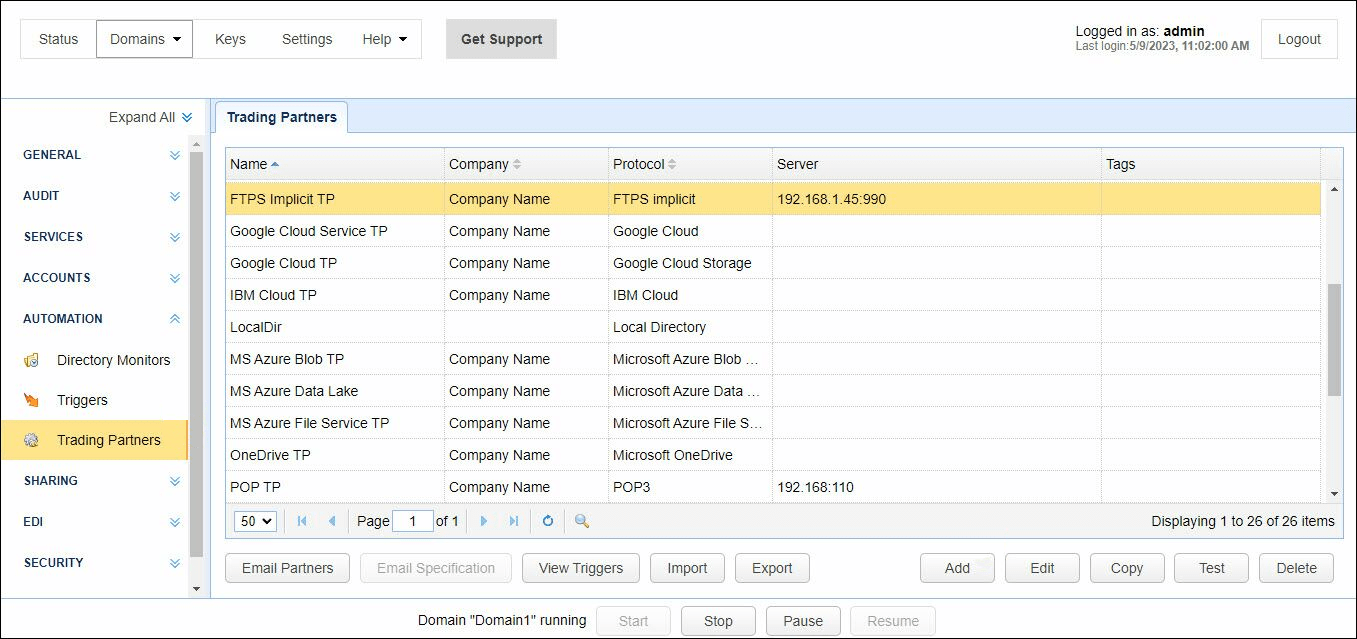
Essentially, you pick the right trading partner and use access credentials so that you can establish a connection. The caveat here is that there is no centralized documentation on setting up integrations. Part of the information is in the public documentation, and part is in the blog.
The SFTP To Go team has tested and documented how to establish connections to dozens of 3rd-party services over SFTP and S3 API: MuleSoft, Workday, NetSuite, Make.com, Zapier, Integrate.io, GoodSync, and many others.
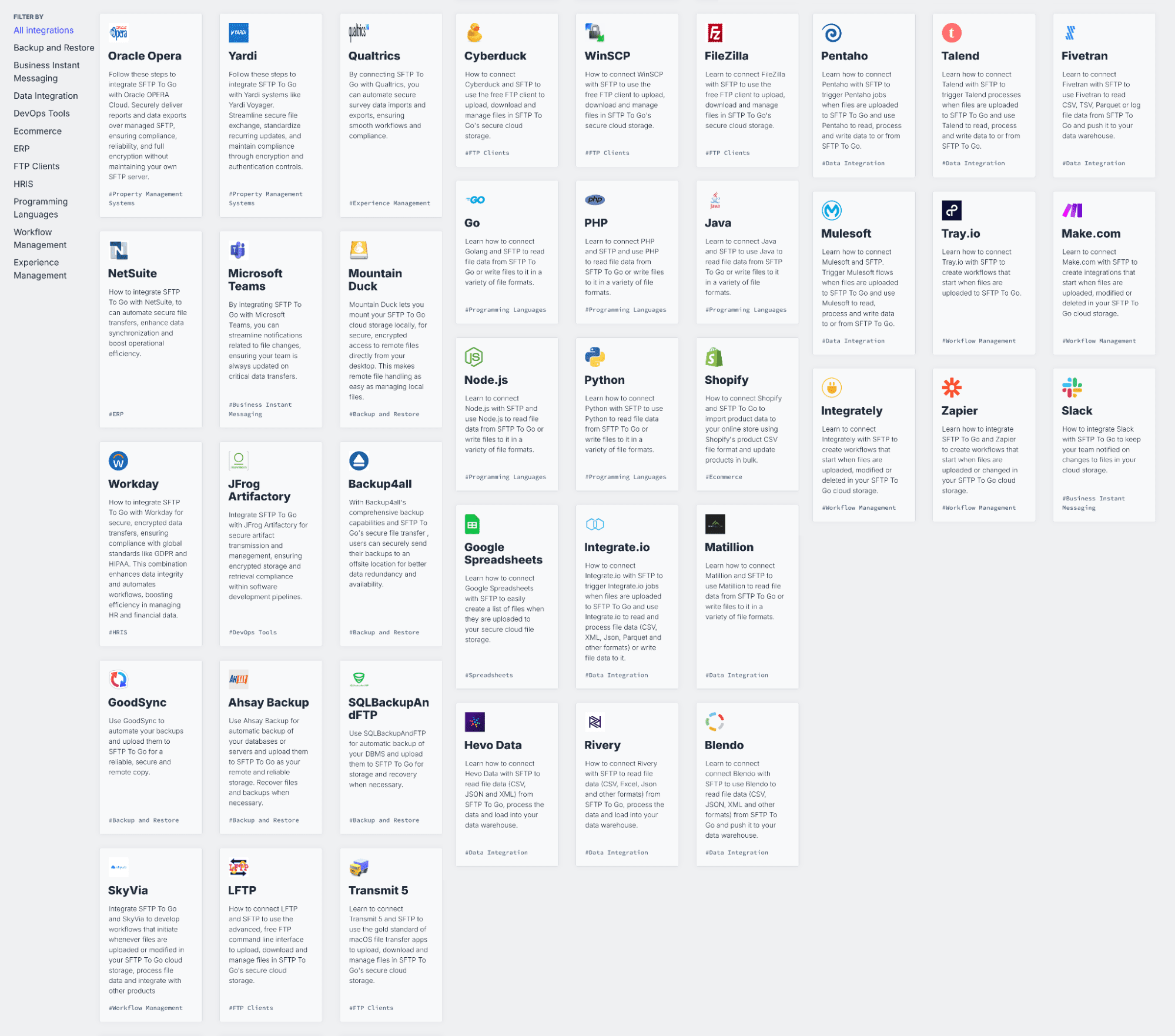
Bottom line: JSCAPE focuses on integrations with 3rd-party data storage providers, and the documentation is all over the place. SFTP To Go supports a great variety of 3rd-party services and has all the documentation in one convenient place.
Round 4: Automation
Automation is where the most interesting things happen on an MFT platform: it should be able to respond to an event in a directory and trigger a chain of other events. For example, a new event lands, and that triggers a process that encrypts the file, copies it elsewhere, and sends a notification over email.
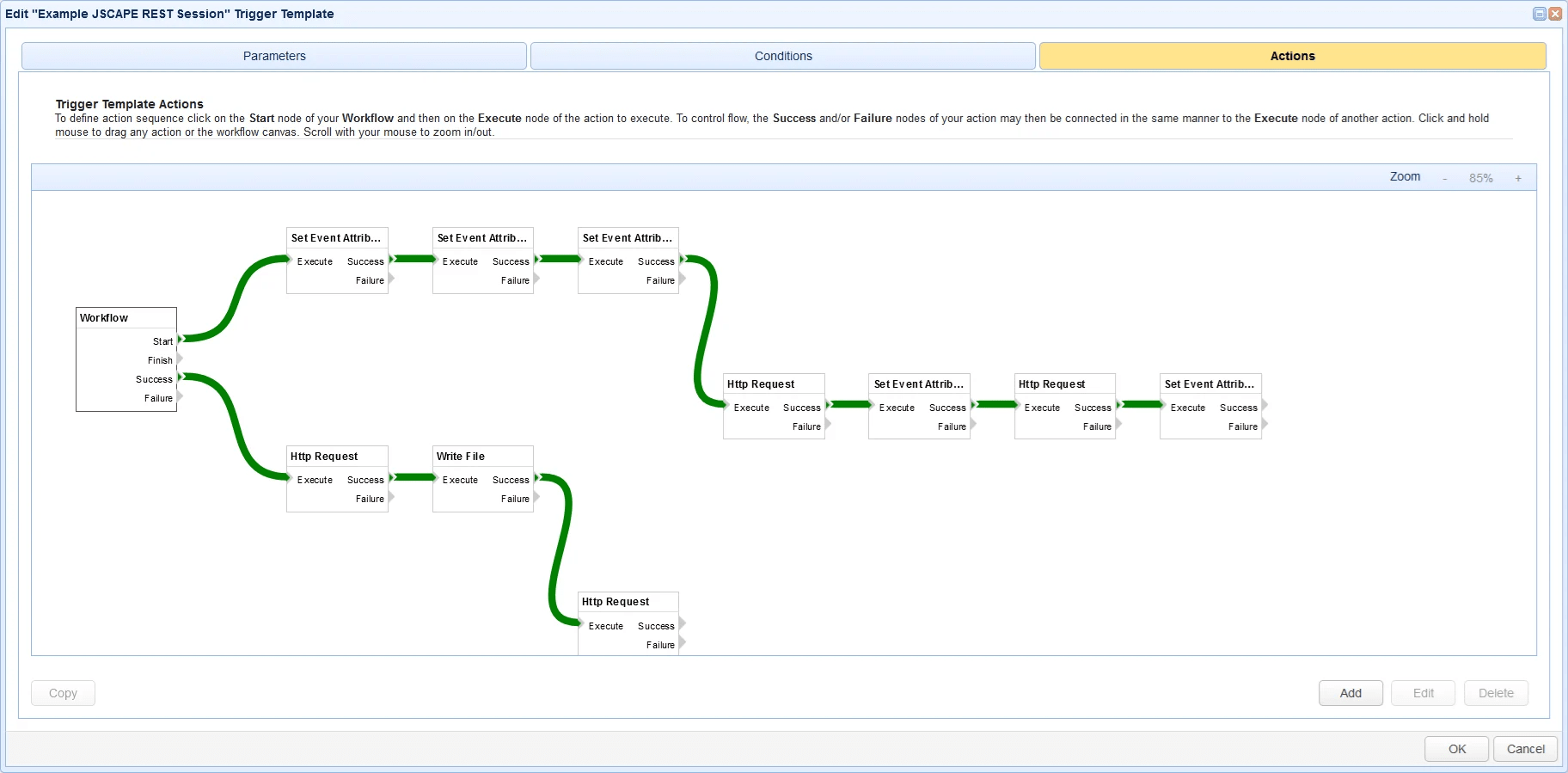
Basic automation, like responding to an event on the storage with an action, requires two steps in JSCAPE: setting a directory monitor, then creating a trigger, selecting the newly created directory monitor, and defining actions.
The general approach is a workflow builder where each node in a flowchart represents a certain action. This caters to the audience that is technically savvy yet prefers a no-code approach to automating transfers.
SFTP To Go takes a leaner approach to automation. Native file automations can run when file events occur or on a schedule, with ordered actions for moving, copying, renaming, deleting, PGP encrypting or decrypting files, creating files or folders, adding delays, sending notifications, and triggering webhooks. Broader business logic can still remain in Git-managed code, iPaaS platforms, or other systems when the process needs to extend beyond the MFT.
For example, your healthcare EDI system might send a file to SFTP To Go, where an automation decrypts it, moves it into the correct processing location, and then sends a webhook to an external EDI or integration system for validation and wider business processing.
This means routine file-level processing can stay inside the managed transfer environment, while more complex application logic can still benefit from code review, automated testing, CI/CD, and version control. See the August 2026 SFTP To Go update for an overview of the new automation capabilities.
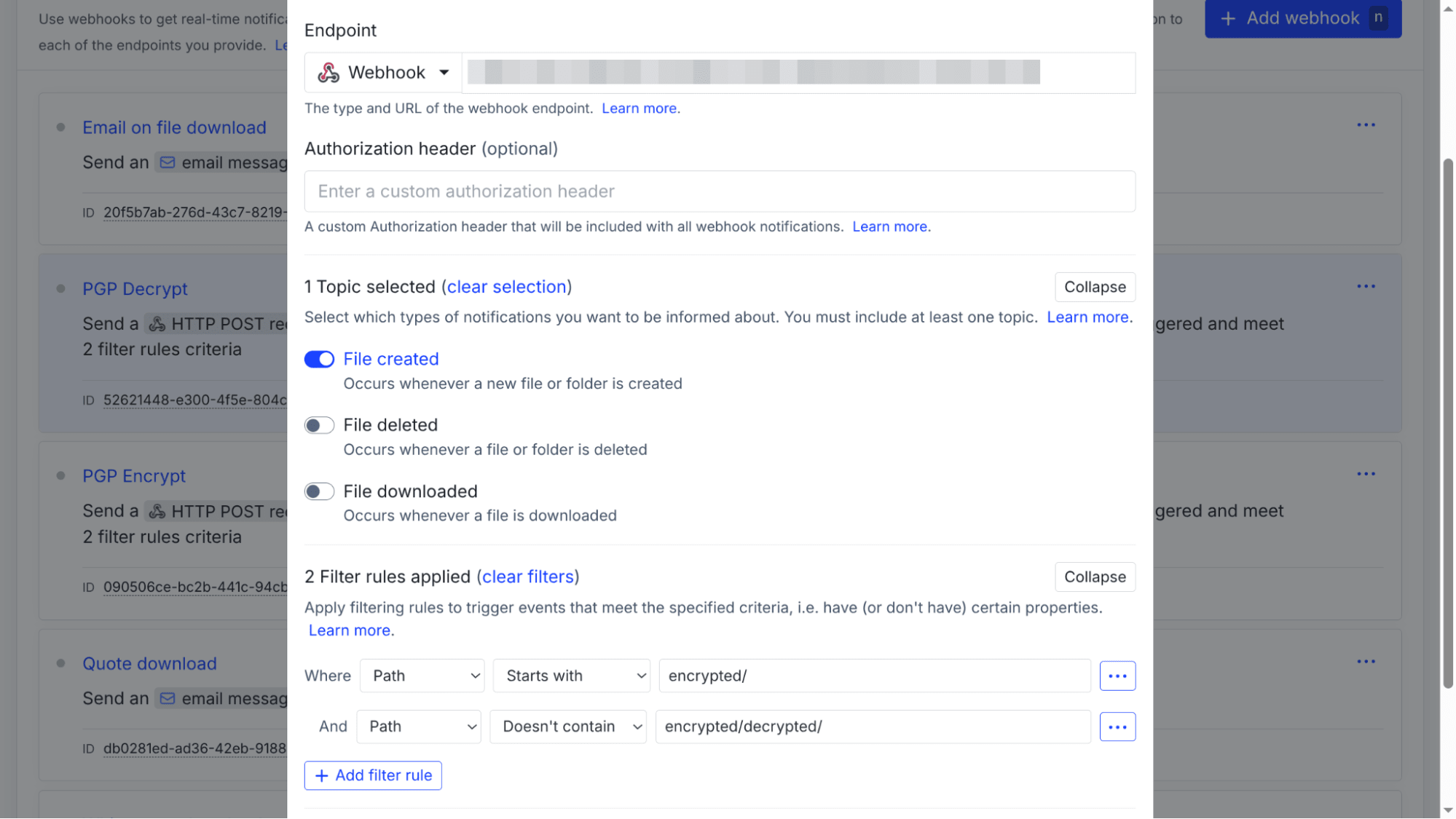
SFTP To Go doesn’t try to turn every business process into an internal MFT workflow. File-level processes can run through native file automations, while application logic that belongs in external code can still use normal Git, testing, review, and CI/CD practices.
JSCAPE provides two sets of REST APIs: a client REST API, for file transfers over HTTP and HTTPS, and a management REST API, for managing the MFT server.
Likewise, SFTP To Go offers a REST API for managing the organization and the standard S3 API for interacting with the storage.
Bottom line: JSCAPE provides a broader visual workflow environment for teams that want more processing logic configured inside the MFT platform. SFTP To Go takes a leaner approach, with practical native file automation inside the managed transfer environment and APIs, webhooks, code, and integration platforms available when workflows need to extend beyond it.
Round 5: Protocol support
JSCAPE supports common protocols such as FTP(S), SFTP, HTTP(S), WebDAV, and AS2, a couple of specialized protocols like OFTP2, the stripped-down version of FTP called TFTP, and AFTP, its own proprietary protocol (see the Performance section for details).
See here for our rundown of the most commonly used EDI protocols.
SFTP To Go focuses on SFTP, FTPS, HTTPS, and AWS S3 API. These protocols cover the majority of real-life file use cases in regulated and non-regulated industries.
Bottom line: JSCAPE supports more protocols on paper, but several of those (OFTP2, TFTP, ATP) serve narrow, legacy, or vendor-locked use cases. SFTP To Go deliberately supports a tighter set of protocols chosen because together they cover the overwhelming majority of real-world regulated and enterprise scenarios.
Round 6: File sharing
JSCAPE supports HTTP transfer with a web panel. However, you need to enable the HTTP service instance-wide, then enable it for a specific domain before you can use it.
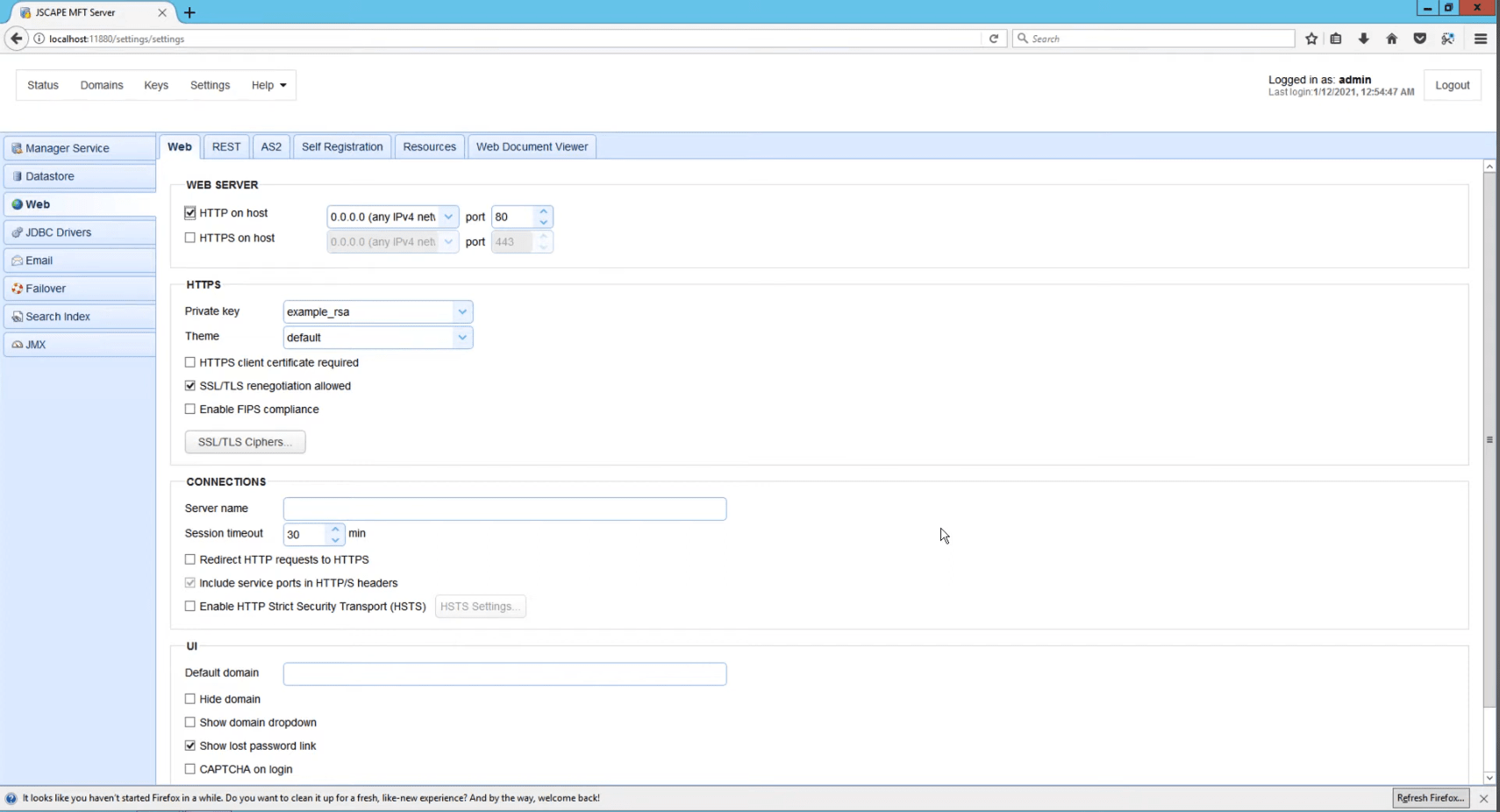
Once you’ve done it, you can share existing files with other system users, send a link over email, or copy a share link.
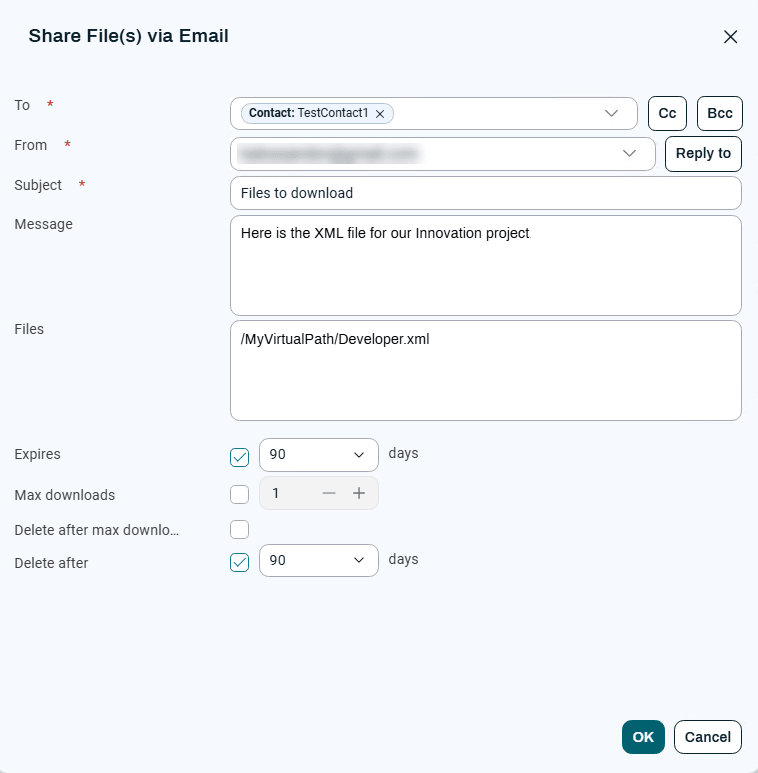
You can set a link expiration date, as well as limit the maximum number of downloads and delete the file after reaching that number. However, there is no access rights management or password protection.
SFTP To Go doesn’t require any configuration before you can start sharing files. Simply select files and/or folders in the file browser, select Share in the drop-down list, and choose how you want to share the data: link permissions, expiration date, access limit, and password protection.
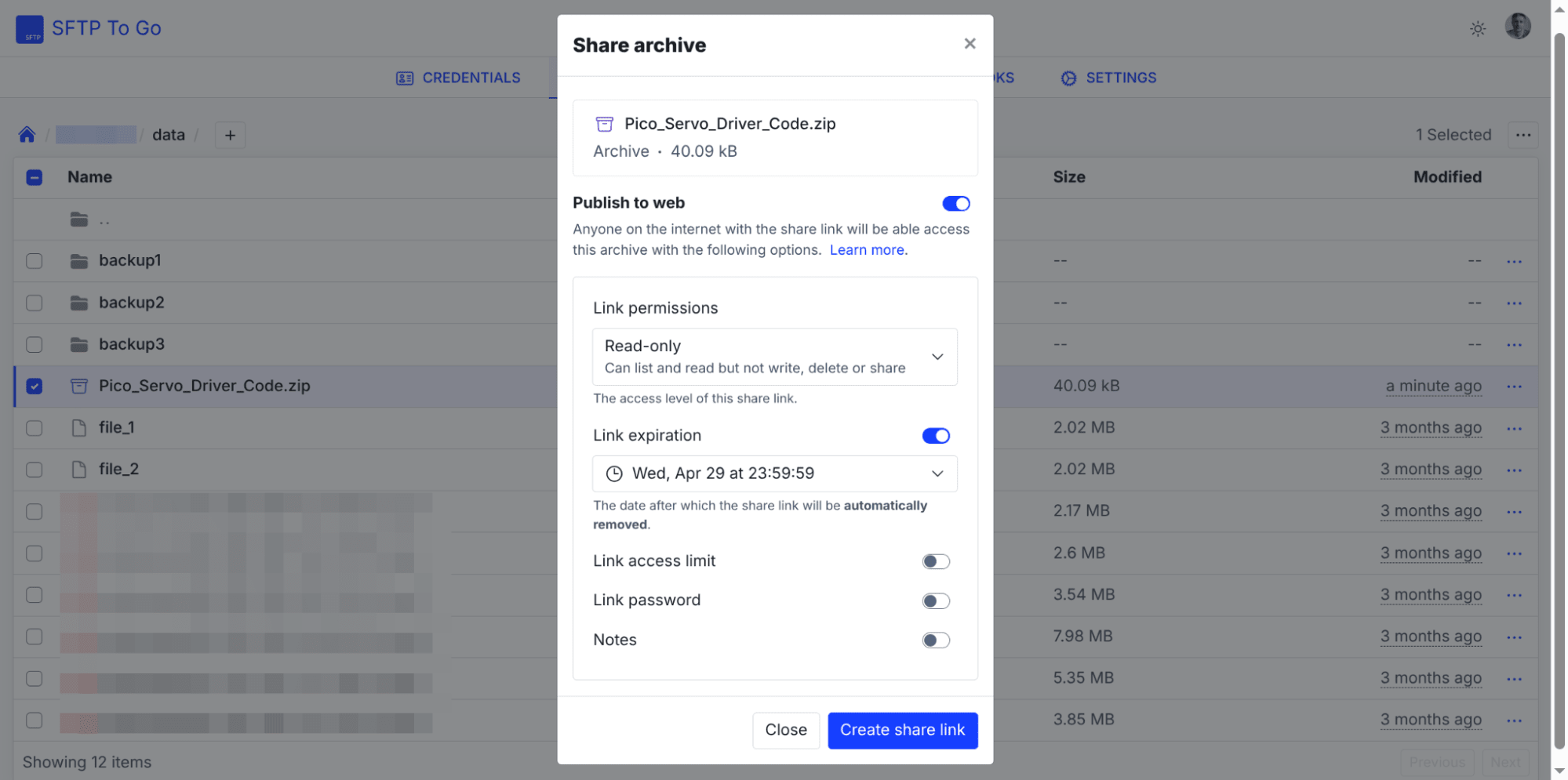
Notably, with SFTP To Go, you can enable both downloading from the shared folder and uploading to it in one go. In JSCAPE, uploads are done with drop zones which are a separate functionality that needs additional configuration steps before you can use it.
Bottom line: While the two platforms have a lot of overlap for sharing files, SFTP To Go has a far more straightforward workflow, combines sharing and uploading into one easy-to-use interface, and offers more access control features.
Round 7: Compliance
Among the major aspects of regulatory frameworks compliance are certification, conformance to data locality requirements, and audit logging support.
JSCAPE supports HIPAA, PCI-DSS, SOX, GDPR, Australian Privacy Principles, and TX-RAMP, and has passed the SOC 2 Type II audit. The platform also provides compliance tools to limit available cryptographic modules to a select few that are compliant with FIPS 140-2.
SFTP To Go has passed the SOC 2 Type II audit and gives regulated teams the secure transfer, storage, access control, audit logging, authentication, and automation features needed to support HIPAA workflows with BAA, GDPR, FERPA, DORA, and GLBA.
In terms of data locality, JSCAPE works just fine as long as you self-host it in your jurisdiction. JSCAPE SaaS is hosted on AWS and uses the U.S. West region for Americas deployments and AWS Frankfurt for Europe, Middle East, and Africa (EMEA). This is a substantial limitation as compared to SFTP To Go, which offers a much wider coverage: USA (multiple states), Canada, UK, Ireland, Germany, Israel, UAE, India, Japan, Singapore, Australia, and Brazil.
Both platforms support logging all events, including admin events, displaying them for each managed organization/domain, and streaming logs to SIEM platforms.
Bottom line: Both platforms clear the SOC 2 Type II bar and cover major frameworks that regulated industries ask for. Self-hosted JSCAPE can run anywhere in the world, but you are in charge. Where SFTP To Go pulls ahead is data locality: JSCAPE SaaS is limited to two AWS regions, while SFTP To Go gives you a real choice of jurisdiction. This matters if your compliance obligations are regional rather than global.
Round 8: Performance & reliability
Both JSCAPE’s and SFTP To Go’s customers cite reliable performance across the board.
One of JSCAPE’s advantages is its proprietary Accelerated File Transfer Protocol (AFTP) that increases the transfer speed manifold. However, the usefulness of the feature is severely limited because this protocol is not available elsewhere, and connections over AFTP only work with JSCAPE AnyClient and other instances of the JSCAPE MFT server.
SFTP To Go works on top of the global AWS infrastructure and thus benefits from the AWS Global Accelerator and S3 Transfer Acceleration. This results in high transfer speeds and doesn’t require the remote service to be running the same software on all ends.
The SaaS version of JSCAPE supports disaster recovery within the region only and does not currently support high availability.
SFTP To Go has high availability on all plans and has additional protection measures: file versioning, automatic replication within a region or outside a region of your choice, and dedicated instances. This gives you peace of mind regarding operational continuity, performance, and the ability to restore files after accidental rewrites.
Bottom line: JSCAPE is missing some important features that improve reliability, and needs an experienced admin to get to the same level of operational continuity that SFTP To Go provides to its customers on all plans.
Round 9: User support
Support service is a frequent negative factor for JSCAPE users. They cite long (up to several days) response times when requesting help with troubleshooting issues.
SFTP To Go provides round-the-clock support through live chat and video calls. Confirmed customers on G2 and Capterra commonly cite the speed and expertise of the support staff. Many reviewers point out that the platform is simple enough to set up without any assistance at all.
Bottom line: JSCAPE customers on G2 consistently describe multi-day response times and having to self-diagnose issues before the support team engages. SFTP To Go’s live chat and video call support are cited in reviews for both speed and technical depth.
Round 10: Total cost of ownership
TCO has always been a highly controversial topic. Both self-hosted and SaaS models have obvious advantages and disadvantages depending on where you are coming from.
While JSCAPE also has a SaaS version, it’s first and foremost self-hosted software that can also run in a hybrid environment. That’s how the company markets it. So for the majority of customers, the total cost of ownership is a sum of license cost, infrastructure and OS provisioning, staff expenses, the cost of outages, etc. The way the platform is built, you really do need a dedicated MFT admin. And if you run it in the cloud, you need a certified AWS/Azure engineer, which comes at extra cost.
JSCAPE also has other issues: long implementation time and an ROI period of 14 months according to customer polls done by G2, high setup complexity, and long response times that affect how fast you can deal with issues, and thus how much your business continuity is affected.
According to the same G2 polls, SFTP To Go takes less than 1 month to implement and has an estimated ROI period of 3 months. Basically, you can start moving files today, and you will see the return on your investments next quarter rather than sometime next year.
Your TCO with SFTP To Go is what you have in the monthly bill, and it’s the same number every month. You can have service usage spikes without paying overages until the spikes become your new norm and call for a tier upgrade.
The service also doesn’t need a dedicated MFT admin. Routine file-level processes can run through file automations, while scripts, webhooks, APIs, or integration platforms can handle broader logic when another system needs to become involved.
Bottom line: With JSCAPE, your total cost of ownership involves licensing, infrastructure, admin salaries, and the business cost of a 14-month ROI window. With SFTP To Go, the TCO is the number on your monthly invoice that stays the same. Beginner tiers are available, usage spikes don’t incur surprise overages, and there’s no dedicated admin to budget for. You get predictability that’s hard to model with a self-hosted platform.
SFTP To Go vs JSCAPE: who's the winner?
Neither of the two platforms is better in a vacuum. They’re built for different operating models. The real question is which model matches how your team works and how fast you need the MFT platform to be up and running.
Choose JSCAPE if:
- You want full control over how your MFT environment is configured and managed.
- You already have someone responsible for MFT administration, or you’re ready to bring in specialized expertise.
- Your team is comfortable with an implementation and onboarding phase that may last months.
Choose SFTP To Go if:
- You need a lean MFT solution with implementation time below 1 month, often, less than a week. You also expect the return on investment in less than a quarter.
- You need a reliable support service that is available 24/7.
- You want file automations for routine event- or schedule-based file processing, while keeping broader application logic in Git-managed code or integration platforms such as Make.com when appropriate.
- You need a managed, cloud-native service with minimal ongoing maintenance overhead and a predictable total cost of ownership.
- You work in a regulated industry like healthcare, financial services, education, or human resources, and you need to meet standards such as HIPAA, FERPA, GLBA, GDPR, or DORA without getting involved with intricate enterprise procurement processes.
Wrapping up
Both solutions have their advantages and suit different teams.
JSCAPE works best for larger companies that have procurement figured out, can hire a dedicated MFT admin, and need full control over an MFT platform more than they need fast implementation, quick return on investment, and easy onboarding.
SFTP To Go doesn’t really care how big a business you have. It has high availability on all tiers to protect your business continuity. For larger companies, it offers extra features that scale with more complex requirements: SSO with your identity provider, VPC peering, static IPs, and dedicated instances when you need stronger network isolation.
Frequently asked questions
I looked up AFTP, JSCAPE’s own transfer protocol. The idea seems reasonable, and the performance boost looks impressive. Where’s the catch?
AFTP is a proprietary protocol simply not available anywhere else, not even in JSCAPE’s sibling MFT platform called Cerberus FTP, also owned by Redwood. You need two licensed JSCAPE MFT servers or the server and the JSCAPE AnyClient application talking to each other to make use of this feature. Meanwhile, SFTP To Go has accelerated transfer when connecting to and from arbitrary third-party systems, thanks to AWS Global Accelerator and S3 Transfer Acceleration.
Why is the implementation time between SFTP To Go and JSCAPE so different? Is this a self-hosted vs SaaS thing?
In short, yes. The level of control over a self-hosted platform that you get is both a blessing and a curse. Running an MFT platform on your infrastructure does have its benefits. The downside is that you are now in charge of everything, so a lot of things start tipping the scales: provisioning cycles, maintenance procedures, availability of trained staff, and so on.
SFTP To Go requires zero provisioning and very little setup. It takes under 5 minutes to complete the first test transfer, and then however much time it takes to write scripts you can trigger on Lambda with outbound webhooks to run the business logic.
What’s a better option: a visual workflow builder or code? Is there a definitive answer?
Absolutely not, this is highly dependent on established practices in every single company out there. However, managing automation in code has compelling benefits.
Code can be version-controlled, while many MFT platforms don’t even support versioned workflows (that includes the JSCAPE MFT server).
Code can be automatically tested and deployed, whereas with workflow builders, it’s manual trial and error.
Code can also plug into the engineering tools you already run, such as monitoring, alerting, logging, and incident response.
You mentioned that running a self-hosted MFT platform like JSCAPE in the cloud requires a certified engineer. Why?
Cloud service platforms like AWS and Azure change frequently, so these platforms issue certificates that stay valid typically between 1 and 3 years. Thus, a certified engineer is someone who is relatively up to date with how this or that platform works.
Certification is definitely not a guarantee of competence, but hiring a certified person is one of the ways to shield yourself from situations like waking up to an overage PaaS bill in the five figures. Notably, you have zero risk of that ever happening with SFTP To Go, where occasional resource usage spikes are possible but are never charged for.
What does bringing your own S3 bucket actually mean in SFTP To Go?
S3 is an extremely popular choice for the long-term storage of data, such as contracts, invoices, various media files, etc. If that’s your case, with SFTP To Go, you don’t need to move all your data to a bucket managed by the platform just to use its automation tools. You can keep your existing storage as-is and use SFTP To Go to manage credentials and webhooks and maintain the audit log for compliance purposes.
Which of the two platforms better covers regulated industries in the US?
For US buyers, the two things to check are data residency and the specific frameworks your industry answers to. Both platform vendors support HIPAA and sign Business Associate Agreements. Beyond HIPAA, SFTP To Go also covers FERPA (education), GLBA (financial services), and DORA, so most regulated US industries have a direct framework match.
Does SFTP To Go support the same file-sharing features that JSCAPE offers, like expiring links and download limits?
Yes, and it goes a few steps further. JSCAPE’s web file-sharing lets you set link expiration and a maximum download count, but has no password protection or granular access rights on shared links. SFTP To Go supports expiration, download limits, and password protection, and lets you enable upload and download on the same shared link, where JSCAPE treats uploads as a separate feature that requires its own setup.
What do VPC peering and dedicated instances actually get me with SFTP To Go?
These two features provide an extra layer of network isolation.
VPC peering can connect your SFTP To Go environment to your AWS VPC over private networking. This allows traffic between your infrastructure and the file transfer endpoint to stay on private routes rather than the public internet.
Dedicated instances give you infrastructure that isn’t shared with other AWS customers. That’s useful if your compliance requirements demand isolated resources, or if you need guaranteed capacity independent of anyone else’s usage.